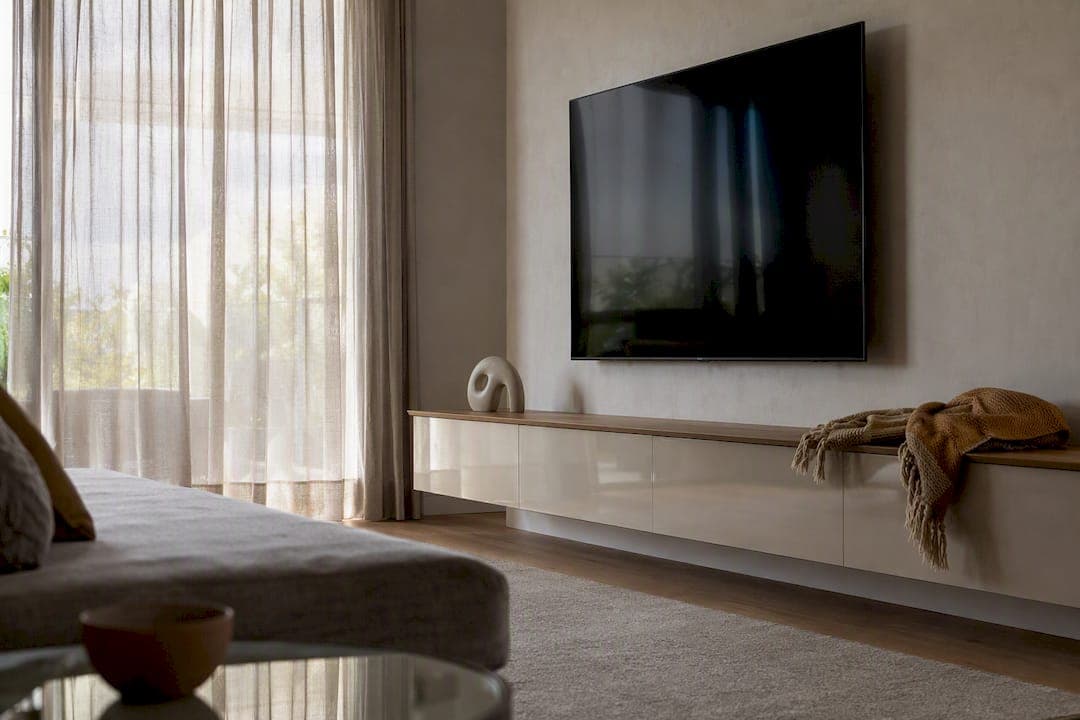
The best floating TV cabinet for most homeowners is a pre-cut DIY kit with a wall-mounted floating console, integrated cable management, and studio-grade finishes, like The Media Wall Store's modular systems. It gets you the custom-built look without the custom-built price tag or a six-week contractor wait.
Here's where to start based on what you actually need:
- Minimal modern living room: Essential Modern Media Walls, a slim floating console paired with a slat accent wall.
- Heavy media setup: Cinema Media Walls, built with deeper storage for consoles, receivers, and soundbars.
- Fireplace ambiance: the Avalon 80" floating TV cabinet with RGB LED fireplace.
- Nonstandard wall width: made-to-measure modular kits that scale by module count.
Each ships pre-cut and pre-labeled for a weekend install, with wire channels built in so nothing hangs off the wall.
Key Takeaways
A floating TV cabinet works best when the buyer matches cabinet width to TV size, confirms stud-based mounting before ordering, and picks a kit with pre-cut panels and built-in cable management.
| Point | Details |
|---|---|
| Match width to TV size | Choose a cabinet 10 to 20 inches wider than your TV on each side for visual balance. |
| Confirm mounting method first | Ask for max TV weight and confirm stud or blocking-strip mounting before you buy. |
| Prioritize cable management | Rear cable slots and removable panels keep wires hidden without cutting drywall. |
| Budget a full weekend | Most kits install in 4 to 8 hours across two days, longer for fireplace inserts. |
| Choose a proven DIY kit | The Media Wall Store's pre-cut, pre-labeled kits, like the Avalon 80" with RGB LED fireplace, cut installation time and cost versus a custom build. |
Table of Contents
- Which Floating TV Cabinet Fits Your Space?
- How Do You Choose the Right Floating TV Cabinet?
- What Size Floating TV Cabinet Fits Your TV?
- Which Materials and Finishes Work Best?
- How Do You Mount a Floating TV Cabinet Safely?
- What Should You Budget for Price and Shipping?
- Why Homeowners Trust The Media Wall Store
- How Long Does Installation Actually Take?
- What Tools Do You Need for Installation?
- How Do You Maintain a Floating TV Cabinet?
- A Straight Answer on What Actually Matters Here
- Get Your Floating TV Cabinet Kit This Week
- Helpful Links for Your Next Steps
- FAQ
Which Floating TV Cabinet Fits Your Space?
Matching the cabinet to your room starts with how you actually use the space, not just how it looks in a photo. Here's how the main options break down.
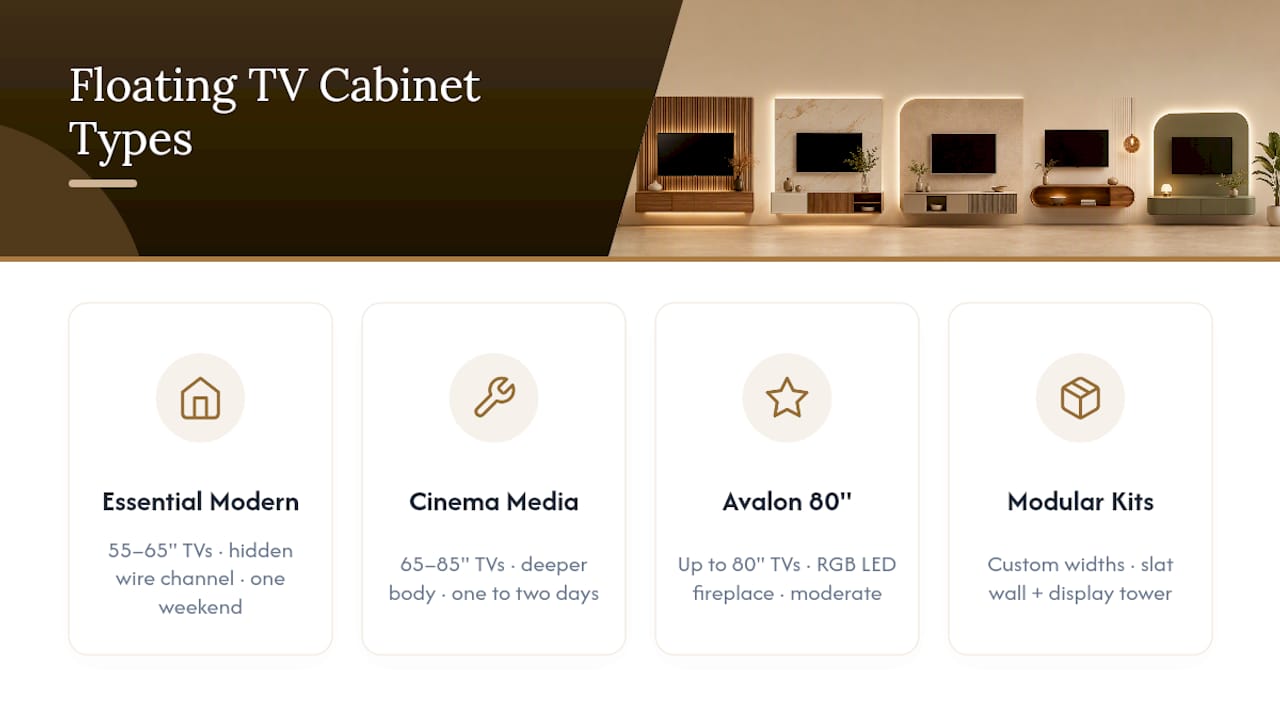
Essential Modern Media Walls suit anyone who wants a clean, low-profile look without visual clutter. Best for TVs 55" to 65". Features a slim floating console, hidden wire channel, and a slat wall backdrop. Installation difficulty: easy, one weekend.
Cinema Media Walls work for home theater setups with multiple components. Best for TVs 65" to 85". Deeper cabinet body for AV receivers and game consoles, reinforced mounting rail. Installation difficulty: moderate, one to two days.
The Avalon 80" floating TV cabinet adds ambiance to the mix. Best for TVs up to 80". Includes an RGB LED fireplace insert and pre-cut panels designed for straightforward installation. Installation difficulty: moderate.
Made-to-measure modular kits, like the Monaco Luxury Media Wall Kit, bundle a floating console with a slat wall and display tower for buyers who want a fully custom width.
Pro Tip: Order swatches or finish samples before committing to a wide cabinet. A slat wall panel that reads warm in a showroom photo can look completely different under your living room's actual lighting.
How Do You Choose the Right Floating TV Cabinet?
Start with five criteria: TV size compatibility, weight and mounting method, storage needs, finish match, and budget against lead time. Skip any one of these and you risk a return, a mounting failure, or a cabinet that just looks wrong on your wall.
Before you buy, ask the seller or check the listing for:
- What is the maximum TV weight the cabinet supports?
- Which mounting hardware is included, and which is sold separately?
- Does installation require studs, or does it work with anchors alone?
- What's the lead time for made-to-measure or custom-finish orders?
- Is there a weekend-install guarantee, or does it need a professional?
Watch for these warning signs in any product listing:
- No stated weight capacity or vague language like "supports most TVs."
- Installation instructions that mention drywall mounting with no reference to studs, anchors, or a blocking strip.
- No return window or unclear warranty terms tied to installation method.
Pro Tip: If a listing doesn't mention a specific weight rating in pounds, assume it hasn't been tested for anything beyond a lightweight display piece. A real floating cabinet built for a TV states its limit plainly.
What Size Floating TV Cabinet Fits Your TV?
Get your tape measure out before you shop; guessing at width is the single biggest cause of a cabinet that looks off once it's on the wall.
- Measure your TV's width edge to edge, including the base if you're keeping it off.
- Mark the centerline height for comfortable seated viewing, typically eye level from your main seating spot.
- Find your wall studs with a stud finder and note their spacing.
- Check clearance needed for a soundbar below the TV or vents on the cabinet's back panel.
A few rules of thumb make this easier. The cabinet should run 10 to 20 inches wider than the TV on each side for visual balance. Depth of 12 to 16 inches comfortably houses a streaming box, game console, or soundbar without crowding.
- 55" TV: pair with a 48 to 60 inch wide cabinet.
- 65" TV: pair with a 60 to 72 inch wide cabinet.
- 75" TV: pair with a 70 to 84 inch wide cabinet, or a made-to-measure module.
Which Materials and Finishes Work Best?
Material choice drives both the look and the maintenance headache down the road. MDF with laminate is the most common base for floating cabinets. It's affordable, resists warping, and takes paint or veneer finishes well. Solid wood accents add warmth but cost more and show scratches faster. Veneer splits the difference: real wood grain over an engineered core, which keeps cost reasonable while still looking premium.
Painted finishes suit modern and mid-century styles; slat accent panels, like the Oslo slat wall kit, lean into farmhouse or Scandinavian aesthetics. Watch for visible seams on lower-cost laminate builds and moisture sensitivity near basements or humid climates.
Look for finish-dependent features that make daily use easier:
- Rear cable slots that route wires without drilling extra holes.
- Removable back panels for access to outlets or a cable box.
- LED channels built into the cabinet's underside or slat wall.
Pro Tip: A rear cable slot combined with a power strip mounted inside the cabinet cavity is the closest you'll get to a wall with hidden wiring without cutting into drywall.
How Do You Mount a Floating TV Cabinet Safely?
Wall type determines everything about your mounting approach. Drywall alone can't support a floating cabinet plus a TV; you need studs, a blocking strip, or a French-cleat system anchored into solid framing, according to The Media Wall Store's mount guide. Concrete and plaster walls each need their own anchor type, so confirm what's included in your kit before you start.
Some listings state weight limits explicitly. IKEA, for example, lists a max TV weight of 66 pounds on certain wall-hung TV benches, with a 44-pound max load per shelf, and warns that units must be anchored to prevent tipping. Always ask for the distributed load rating, not just a single weight number.
Hire a professional if you're mounting a TV over 65 pounds, working with concrete or plaster, or dealing with an uneven wall. Most DIY installs, when the wall is standard drywall over studs, take a single weekend.
- Confirm hardware included versus what you need to buy separately.
- Locate studs before you order to confirm cabinet width lines up.
- Ask whether the kit uses a reinforced mounting rail or French-cleat system.
Pro Tip: A stud finder that reads both wood and metal saves you from mounting into a hollow spot behind older plaster walls.
What Should You Budget for Price and Shipping?
Off-the-shelf floating cabinets typically run less than made-to-measure or fireplace-integrated builds, since custom widths and LED inserts add both material and labor cost. Expect a noticeably higher price for a fully modular, made-to-measure system compared to a standard-width kit.
Before ordering, confirm:
- Shipping lead time, especially for made-to-measure widths.
- Whether shipping is free or tiered by order size.
- Return window length and any restocking fee on opened kits.
- Warranty terms, and whether professional installation is required to keep coverage valid on heavier setups.
A one-year warranty on a heavy TV mount is only worth the paper it's printed on if the mounting hardware actually gets anchored into studs the way the instructions specify.
Pro Tip: Photograph your stud locations and wall type before installation starts. If you ever need a warranty claim, having proof you followed the mounting instructions speeds up the process considerably.
Why Homeowners Trust The Media Wall Store
Pre-cut, pre-labeled kits remove the guesswork that turns a weekend project into a month-long ordeal. Every panel arrives numbered, every bracket matched to its slot, so assembly follows a straightforward sequence instead of an improvised one.
Over 1,000 customers have completed installs using this approach, backed by pre-cut kits positioned as a cost-effective alternative to a fully custom build.
"We wanted the high-end look of a custom media wall but couldn't stomach the contractor quote," is the kind of feedback that shows up again and again in customer reviews, reflecting a common gap between what a custom build costs and what a DIY kit delivers at a fraction of the price.
Browse the Monaco Noir Luxury Media Wall Kit to see how the floating console and slat wall combination looks finished.
How Long Does Installation Actually Take?
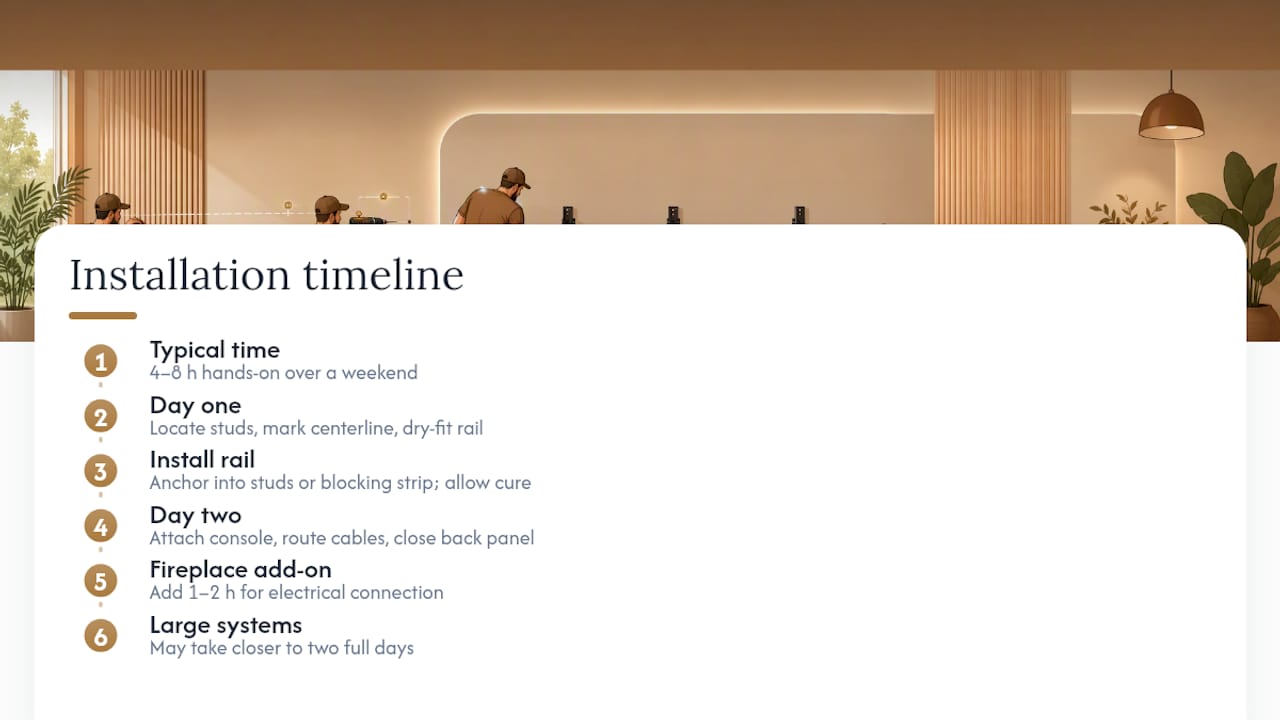
Most floating TV cabinet kits install in a single weekend, roughly 4 to 8 hours of hands-on work spread across Saturday and Sunday. The exact time depends on wall type, cabinet width, and whether you're adding accent features like a slat wall or LED fireplace insert alongside the console.
Here's the general sequence:
Day one starts with locating studs and marking your centerline height. You'll dry-fit the mounting rail or French-cleat bracket against the wall before drilling anything, confirming it sits level and lines up with your TV's planned position. Once confirmed, you anchor the rail into studs or a blocking strip, then let any adhesive or filler cure if your kit calls for it.
Day two is assembly and finishing. The floating console body attaches to the mounting rail, cable channels get routed before the back panel closes up, and any slat wall or fireplace panels install around the console. TV mounting comes last, once the cabinet itself is secure and level.
Kits with a fireplace insert, like the Avalon 80", add roughly an hour or two for electrical connection and insert placement, though the unit itself still ships pre-cut for a weekend timeline. Larger made-to-measure modular systems can stretch closer to two full days simply due to the added panel count.
The biggest time sink for most first-time installers isn't the cabinet at all. It's locating studs cleanly and confirming wall type before drilling the first hole. Budget extra time for that step rather than rushing it.
What Tools Do You Need for Installation?
A floating TV cabinet install draws on a fairly standard tool kit, most of which you probably already own if you've hung a shelf before.
Essential tools:
- Stud finder (one that reads both wood studs and metal, if your home has metal framing)
- Level, ideally a 24 inch or longer bar level for accuracy across a wide cabinet
- Power drill with both driver bits and a masonry bit if you're anchoring into concrete or brick
- Tape measure and pencil for marking centerline height and stud spacing
- Socket wrench or Allen key set, usually included in the kit for panel assembly
Hardware that typically comes included in the kit:
- Mounting rail or French-cleat bracket
- Lag bolts sized for stud mounting
- Wall anchors for sections that fall between studs
- Cable management clips or a routing channel insert
Hardware you may need to supply separately:
- Toggle bolts or heavier-duty anchors if your walls are plaster over lath rather than standard drywall
- A masonry drill bit set for concrete or brick walls
- An extension cord or power strip if you're routing electronics inside the cabinet cavity
If your kit includes an LED fireplace or lighting channel, you'll also want a non-contact voltage tester before making any electrical connections, just to confirm the circuit is safe to work on. Most DIYers skip this step and shouldn't.
How Do You Maintain a Floating TV Cabinet?
A floating cabinet needs less upkeep than a traditional entertainment center, but a few habits keep it looking new for years instead of months.
Dust and clean regularly. A microfiber cloth handles most laminate and veneer surfaces fine. Avoid ammonia-based cleaners on painted finishes, since they can dull the sheen over time. For solid wood accents, a dry cloth followed by an occasional wood-safe conditioner keeps the grain from drying out.
Check mounting hardware annually. Wall anchors and lag bolts can loosen slightly over months of thermal expansion and contraction, especially in homes with big seasonal temperature swings. A quick check with a socket wrench once a year catches this before it becomes a safety issue.
Watch for moisture near cable channels. If your cabinet sits near a window or in a room with high humidity, periodically check the rear panel and cable slot for condensation buildup, which can warp MDF over time.
Touch up finishes as needed. Painted surfaces and laminate edges take the most wear from remotes, game controllers, and accidental bumps. Keep a small amount of matching touch-up paint or veneer repair marker on hand for scuffs.
Re-tighten LED connections if your kit includes lighting. Vibration from daily use can loosen low-voltage connectors over time, particularly on fireplace inserts with moving parts. A yearly check keeps the ambiance feature working without a service call.
A Straight Answer on What Actually Matters Here
Most buying guides spend paragraphs on aesthetics and barely mention the one thing that determines whether your cabinet stays on the wall: what's actually behind the drywall. A gorgeous slat wall finish means nothing if the mounting rail sits on anchors alone with a 75-inch TV hanging off it.
The overlooked truth is that installation quality, not finish selection, is where most floating TV cabinet projects go wrong. A kit that ships pre-cut and pre-labeled removes the guesswork of measuring panel widths and cutting slat boards square, but it doesn't remove the responsibility to find studs and confirm your wall type before drilling. That part is on you, and it's worth doing right the first time.
Get Your Floating TV Cabinet Kit This Week
Themediawallstore skips the contractor quote entirely. You order a pre-cut, pre-labeled kit, follow the numbered assembly sequence, and have a finished floating media wall by Sunday night, at a fraction of what a custom carpenter would charge for the same look.
Every kit ships with clear installation guidance and backs a one-year warranty, and returns are straightforward if a piece doesn't fit your space the way you expected. Browse the Essential Modern Media Walls collection for a minimalist option, or check the Cinema Media Walls line if you're building around a bigger setup. Need something wider or narrower than standard? Shop the full kit catalog to compare made-to-measure options, or reach out for a design consultation if you're in the SF Bay Area and want white-glove installation instead of a weekend DIY project.
Helpful Links for Your Next Steps
- Shop DIY media wall kits: browse cabinet styles and sizes.
- Avalon 80" floating cabinet: fireplace-integrated option.
- Mount guide: DIY mounting steps.
- Home organization systems: pairing storage with your setup.
FAQ
Are Floating TV Stands a Good Idea?
Yes, for most living rooms. A wall-mounted floating unit keeps the floor clear and hides cables, and pre-cut DIY kits make the installation manageable in a single weekend.
Can a TV Go on a Floating Shelf?
Yes, as long as the shelf and its mounting hardware are rated for your TV's weight and anchored into studs or a blocking strip rather than drywall alone. A properly reinforced mounting rail, like those used in Themediawallstore's kits, is built specifically for this purpose.
How Much Weight Can a Floating TV Shelf Hold?
Weight capacity varies by product. Some wall-hung TV benches list a max TV weight around 66 pounds, so always check the specific listing's stated maximum and mounting requirements before buying.
What Is the Best Floating TV Stand?
For most homeowners, a pre-cut floating TV cabinet kit with integrated cable management and a reinforced mounting rail offers the best balance of look, cost, and installation ease. Options like the Essential Modern Media Walls or the Avalon 80" with RGB LED fireplace cover the most common use cases.
Recommended
- Modern Floating TV Stand – Marble Black & Oak Wall Mounted Media Console | The Media Wall Store
- Avalon 80" Floating TV Cabinet with RGB LED Fireplace | The Media Wall Store
- Modern Walnut Slatted TV Console Cabinet – Mid Century Entertainment Center | The Media Wall Store
- Decor Ideas for TV Wall: 10 Stylish Upgrades