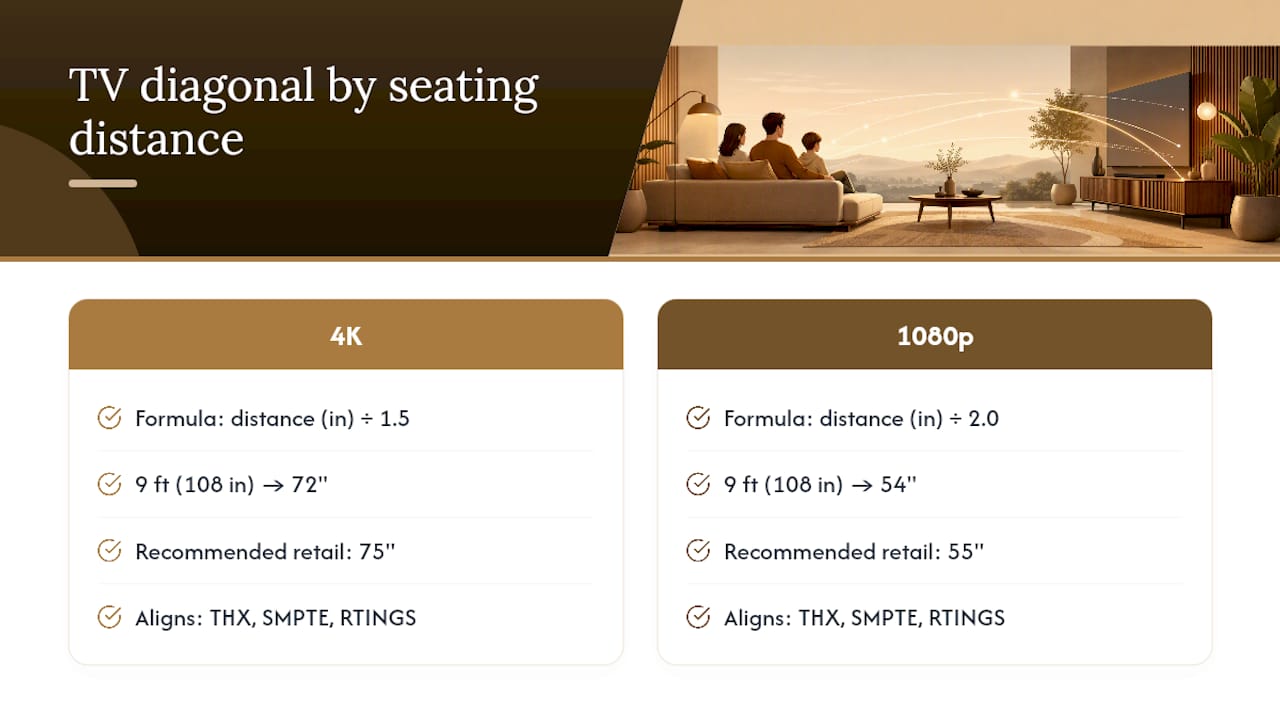
Measure your seating distance in inches and divide by 1.5 for a 4K TV, or by 2.0 for a 1080p set. That single calculation gives you a solid recommended diagonal. Sit 9 feet from the wall? That's 108 inches. Divide by 1.5 and you land at 72 inches, so a 75" 4K TV is the natural pick. Divide by 2.0 for 1080p and you get 54", pointing you toward a 55" screen. Those ranges align with the THX and SMPTE viewing-angle standards that professional calibrators use, and they're the same benchmarks RTINGS applies in its size-to-distance guidance.
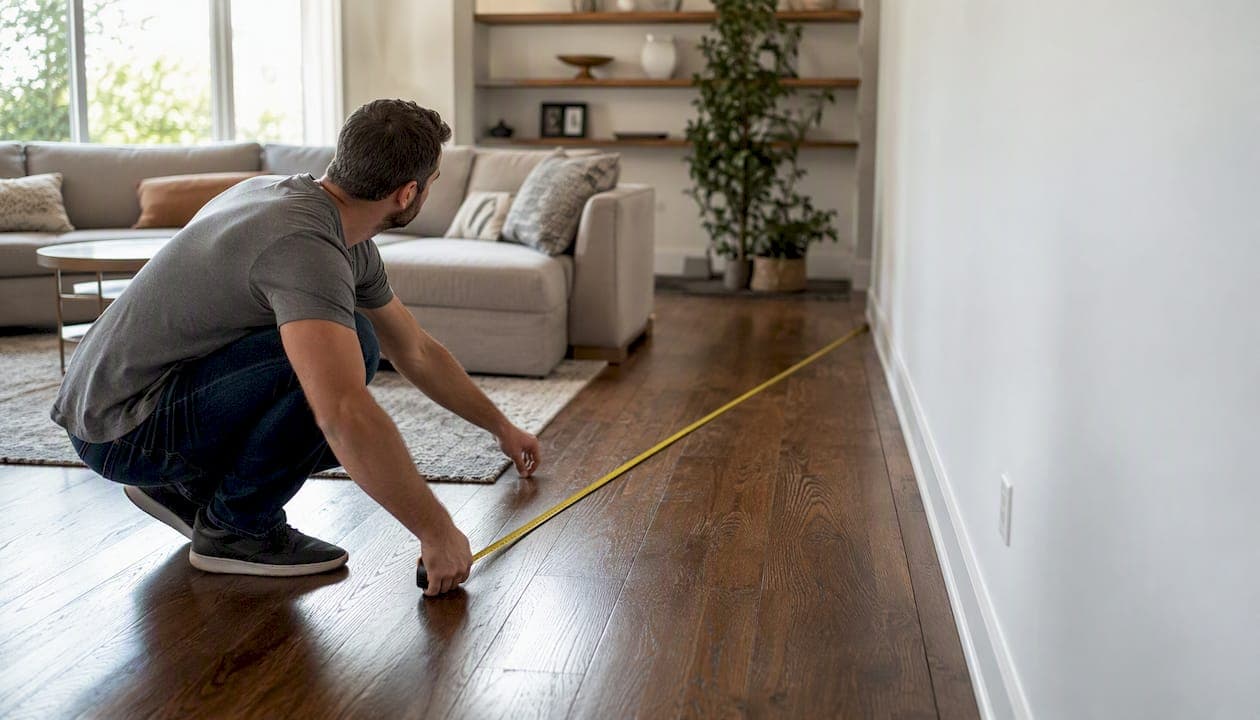
Before you read another word, grab a tape measure and record your seating distance. Everything below builds on that one number.
Key Takeaways
The right TV size for your room comes down to one measurement: seating distance in inches divided by 1.5 for 4K, or by 2.0 for 1080p, rounded to the nearest retail size.
| Point | Details |
|---|---|
| Use the formula first | Divide seating distance (inches) by 1.5 for 4K or 2.0 for 1080p to get your recommended diagonal. |
| 4K lets you sit closer | 4K panels allow 30–40% closer viewing than 1080p, justifying a larger screen in the same room. |
| Check physical fit separately | Confirm TV width, VESA pattern, and doorway clearance from the spec sheet before purchase. |
| Living room sweet spot | An 8–10 ft seating distance typically points to a 65" 4K TV as the practical baseline. |
| Themediawallstore kits | Pre-cut kits list TV opening dimensions explicitly, removing fit uncertainty before assembly. |
Table of Contents
- How to measure your room and viewing distance correctly
- How the formula works: 4K vs. 1080p math
- TV viewing distance chart: recommended diagonals by room depth
- Room-by-room size guidance for every space
- How to check physical fit before you buy
- Trade-offs when you're choosing between two sizes
- How media walls change the TV size you should buy
- Quick checklist for choosing between two adjacent sizes
- The mistake most buyers make, and how to avoid it
- A media wall kit takes the sizing risk out of the equation
- Sources
- FAQ
How to measure your room and viewing distance correctly
The only measurement that drives the formula is the distance from your primary seating position to the center of where the screen will sit. Here's how to get it right.
Step-by-step measurement checklist:
- Sit in your normal viewing spot, not the edge of the sofa.
- Measure from the back of that seat to the planned screen center on the wall.
- Record in both feet and inches (multiply feet by 12 to convert).
- Measure the available wall width where the TV will hang or stand.
- Note the mounting height: the screen center should land near seated eye level, roughly 40–42 inches from the floor for a standard sofa.
Common gotchas to watch for:
- Open-plan rooms often have two seating zones at different distances. Use the closer row as your primary measurement; the farther row will still have a comfortable view on a larger screen.
- Corner placements add effective distance. Measure the straight-line distance from seat to screen, not along the wall.
- Multiple seating rows in a home theater mean the back row sets the minimum size, not the front.
Pro Tip: Mark the screen center on the wall with a piece of painter's tape before you buy. Stand at your sofa and check whether the height feels right. Adjusting tape costs nothing; adjusting a wall mount costs time.
How the formula works: 4K vs. 1080p math
Resolution changes the divisor because pixel density changes how close you can sit before individual pixels become visible. RTINGS data shows that 4K panels let you sit noticeably closer than 1080p before pixels are visible, which is why the two formulas use different numbers.
The formulas:
- 4K TV: seating distance (inches) ÷ 1.4 to 1.6. Use 1.4 for an immersive, cinematic feel; use 1.6 for a more relaxed field of view. The midpoint, 1.5, works for most living rooms.
- 1080p TV: seating distance (inches) ÷ 2.0 to 2.5. Use 2.0 for the largest comfortable size; use 2.5 for a conservative pick.
Calculator workflow:
- Measure seating distance in inches.
- Decide: 4K or 1080p? Immersive or relaxed?
- Divide by the appropriate number.
- Round to the nearest retail size: 43, 50, 55, 65, 75, or 85 inches.
The SMPTE standard targets a 30° viewing angle; THX pushes closer to 36° for a more immersive experience. Both are captured in the 1.4–1.6 divisor range for 4K.
Pro Tip: When you land between two retail sizes, round up if your wall width and budget allow. Consumer tech guidance consistently notes that buyers regret going too small far more often than too large, a pattern Yahoo Tech and Tom's Guide both flag.
TV viewing distance chart: recommended diagonals by room depth
Recommended screen diagonals generally increase with seating distance for both 4K and 1080p, with typical ranges provided by viewing standards. For example, seating distances around 8 to 10 feet often suit TVs in the 65 to 75 inch range for 4K.
Sources: Tvsize and the THX/SMPTE-based calculator at Viewingdistancecalculator.
A 65" 4K TV commonly fits living rooms with seating around 8 to 10 feet. Larger screens like 85" may be comfortable for deeper rooms, though this depends on space and personal preference.
Room-by-room size guidance for every space
The formula gives you the math; the room gives you the context. Here's how common spaces typically shake out.
- Living room (10–14 ft depth): A 65–75" 4K TV covers most setups. Rooms deeper than 12 feet can comfortably run an 85". Best Buy's room-sizing guidance puts 65" as the practical sweet spot for 8–10 ft seating distances, which matches the majority of American living rooms.
- Bedroom (8–10 ft from bed to wall): 43–55" is the comfortable range. Bedrooms rarely justify anything larger; the viewing angle from a bed often places the screen higher than ideal, which makes a smaller diagonal easier on the neck.
- Kitchen (counter or bar seating, 5–7 ft): 32–43" is the ceiling. Kitchens are secondary viewing environments; oversizing creates glare and visual clutter.
- Small apartment or studio (6–8 ft): 43–55" works well. A 55" 4K TV at 7 feet is perfectly comfortable and won't dominate a small room the way an 85" would.
- Home theater (12+ ft, dedicated room): 85" and above, or a projector. A 12×12 room with seating at 10 feet lands squarely in the 75–85" range for 4K. For home theater wall setups, the screen is often the room's architectural anchor, so sizing up is usually the right call.
Seating configuration matters too. A sectional that wraps around the room creates off-axis viewers; a larger screen helps those seats without hurting the center position. A single sofa facing the wall is the easiest case: measure once, apply the formula, done.
For living room layout inspiration that accounts for TV scale and proportion, this guide on transforming a plain living room covers furniture arrangement around a focal-point screen.
How to check physical fit before you buy
Diagonal size is not the same as TV width. A 65" TV measures roughly 57" wide and 32" tall in a standard 16:9 frame. An 85" TV is about 74" wide. Those numbers matter when you're checking whether the set fits your wall, stand, or media wall opening.
Samsung's buying guide makes the point plainly: screen size is measured corner-to-corner diagonally, and buyers must confirm width, height, and VESA mounting pattern on the product spec sheet before finalizing a purchase.
Physical fit checklist:
- Measure your wall width and subtract at least 6 inches on each side for visual breathing room.
- Check the product spec sheet for actual width and height, not just diagonal.
- Confirm VESA pattern matches your wall mount or media wall bracket.
- For stand placement, verify the stand footprint fits your furniture surface.
- Allow 4 inches of clearance behind the TV for ventilation and cable access.
- Measure doorways, hallways, and stair turns before delivery. Practical constraints frequently set the real-world size cap for very large TVs, not the viewing-distance math.
Stand vs. wall mount: A wall mount brings the screen flush to the wall, saves floor space, and allows precise height adjustment. A stand is easier to reposition but adds depth and limits height options. For media wall mounting, the mount is typically integrated into the kit structure, which removes most of the guesswork.
Pro Tip: Before ordering an 85" TV, check the shipping box dimensions. Many 85" sets arrive in boxes over 80" wide and 50" tall. Measure your front door, any interior doors, and stairwell turns. A TV that can't enter the room is a return waiting to happen.
Trade-offs when you're choosing between two sizes
Bigger is not always better, but it's often better than you think. Here's how to weigh the real trade-offs.
- Immersion vs. comfort: A larger screen fills more of your field of view, which feels cinematic for movies and sports. Too large for the distance and you'll move your head to follow action, which gets tiring fast. The formula's upper divisor (1.4 for 4K) marks the immersive edge; the lower divisor (1.6) marks the relaxed edge.
- Pixel visibility: At 1080p, sitting too close reveals individual pixels. At 4K, you can sit 30–40% closer before that happens, which is the core reason 4K justifies a larger screen in the same room.
- Cost and mounting constraints: Larger TVs cost more and require heavier-duty mounts. An 85" TV typically needs a mount rated for 100+ lbs and a stud-anchored installation.
- Content type: Gaming and sports benefit from larger screens at closer distances. A 75" screen at 9 feet for gaming feels genuinely different from a 65" at the same distance. Movies reward the same. Casual news or background TV? The smaller size is fine.
- Decision rule: If your wall width, seating distance, and budget all say yes, take the larger size. If any one of those says no, take the smaller one without second-guessing.
How media walls change the TV size you should buy
A media wall kit adds a layer of fit considerations that a bare wall doesn't. The kit's TV opening has a fixed maximum width, and that width, not the viewing-distance formula, becomes the binding constraint for very large screens.
- Measure the kit's TV opening width before selecting a diagonal. A kit designed for up to 75" won't safely accommodate an 85" set, even if the viewing distance math says 85" is ideal.
- Pre-cut kits from Themediawallstore include labeled panels and specified TV opening dimensions, so you know the maximum diagonal before assembly begins. That removes the guesswork that causes returns on ad hoc builds.
- Floating cabinetry below the TV opening affects mounting height. Account for cabinet depth and height when calculating where the screen center will land relative to seated eye level.
- Integrated cable management in a media wall kit means you need to plan wire routing before the TV goes up, not after. Identify HDMI, power, and audio cable paths during the measurement phase.
- For media wall kit options that list TV opening dimensions explicitly, cross-reference the kit spec with your chosen TV's width from the product spec sheet.
The practical advantage of a pre-built kit is predictability. You know the opening, the finish, and the cable routing before a single panel goes up. That's a different experience from building around a TV after the fact and hoping the proportions work out.
Quick checklist for choosing between two adjacent sizes
When you're standing between a 65" and a 75", or a 75" and an 85", run through this before deciding:
- Wall width: Does the larger TV leave at least 6 inches of visual margin on each side?
- Seating distance: Does the larger size stay within the formula's comfortable range (distance ÷ 1.4 for 4K)?
- Content preference: Do you watch movies, sports, or gaming more than casual TV? Lean larger.
- Cost difference: Is the price gap worth the size gain for how you actually use the room?
- Mounting method: Can your wall, mount, or media wall kit support the larger TV's weight and width?
- Transport: Can the larger TV physically enter the room through your doors and hallways?
If all six answers point to yes, take the larger screen. If even one is a hard no, the smaller size is the right call. Revisit the TV viewing distance chart: recommended diagonals by room depth above and the measurement checklist to verify before checkout.
The mistake most buyers make, and how to avoid it
Most people buy too small. They stand in a showroom, look at a 65" next to an 85", and the 65" looks enormous. At home, with 10 feet of distance and a full wall behind it, that same 65" looks modest. Showroom lighting, proximity, and the absence of furniture context all make screens look bigger in stores than they do in living rooms.
The practical rule: if the formula says 72" and you're choosing between 65" and 75", take the 75" as long as the wall and doorways allow it. The viewing-distance math supports it, and the regret data supports it too. The one exception is a room where the seating is unusually close, under 7 feet, where a very large screen genuinely causes discomfort.
Transport is the other underestimated constraint. Measure doorways before you order anything above 75". It's a five-minute check that prevents a genuinely frustrating return.
A media wall kit takes the sizing risk out of the equation
Getting the TV size right is one decision. Getting it to look intentional on the wall is another. Themediawallstore's DIY media wall kits are pre-cut and pre-labeled with specified TV opening dimensions, so you know exactly what diagonal fits before assembly starts. No guessing, no returns because the proportions looked different in person.

Each kit includes integrated cable management and floating cabinetry options, which means the wire routing and mounting height are solved as part of the build, not as afterthoughts. For homeowners who want a finished, high-end look without a contractor's timeline or budget, the kits install over a weekend. Browse the full range of media wall kits and cross-reference the TV opening dimensions with your chosen diagonal before you order.
Sources
- RTINGS — Size-to-distance relationship
- TV Viewing Distance Calculator — Based on THX & SMPTE standards
- Tvsize
- Samsung — What size TV should I get? | Guide to TV sizes
- Best Buy — What TV size is best for my room?
FAQ
Is a 65" TV too big for a living room?
Not for most living rooms. At 8–10 feet of seating distance, a 65" 4K TV falls squarely within the comfortable viewing range using the standard formula. It's the most common size for American living rooms precisely because it fits that depth well.
Is a 55" TV too big for a bedroom?
Rarely. A 55" TV at 8 feet is within the 4K formula's comfortable range. The more common bedroom issue is mounting height: beds place viewers lower than sofas, so the screen center often ends up too high, which is a placement problem, not a size problem.
What size TV works in a 12×12 room?
With seating roughly 8–9 feet from the wall, the formula points to a 65–75" 4K TV. A 65" is the practical sweet spot for that room depth, leaving comfortable visual margin and staying within the formula's relaxed range.
Is an 85" TV too big for a bedroom?
For most bedrooms, yes. Bedrooms typically have 8–10 feet of depth, and the formula puts the comfortable 4K ceiling around 55" at that distance. An 85" at 9 feet pushes past the immersive edge of the formula and can cause the head-turning discomfort the guidelines are designed to prevent.
What size TV fits a media wall?
It depends on the kit's TV opening dimensions, not just the viewing-distance formula. Always check the kit spec sheet for maximum TV width, then cross-reference with your chosen TV's actual width from its product page. Themediawallstore kits list these dimensions explicitly so you can confirm fit before ordering.