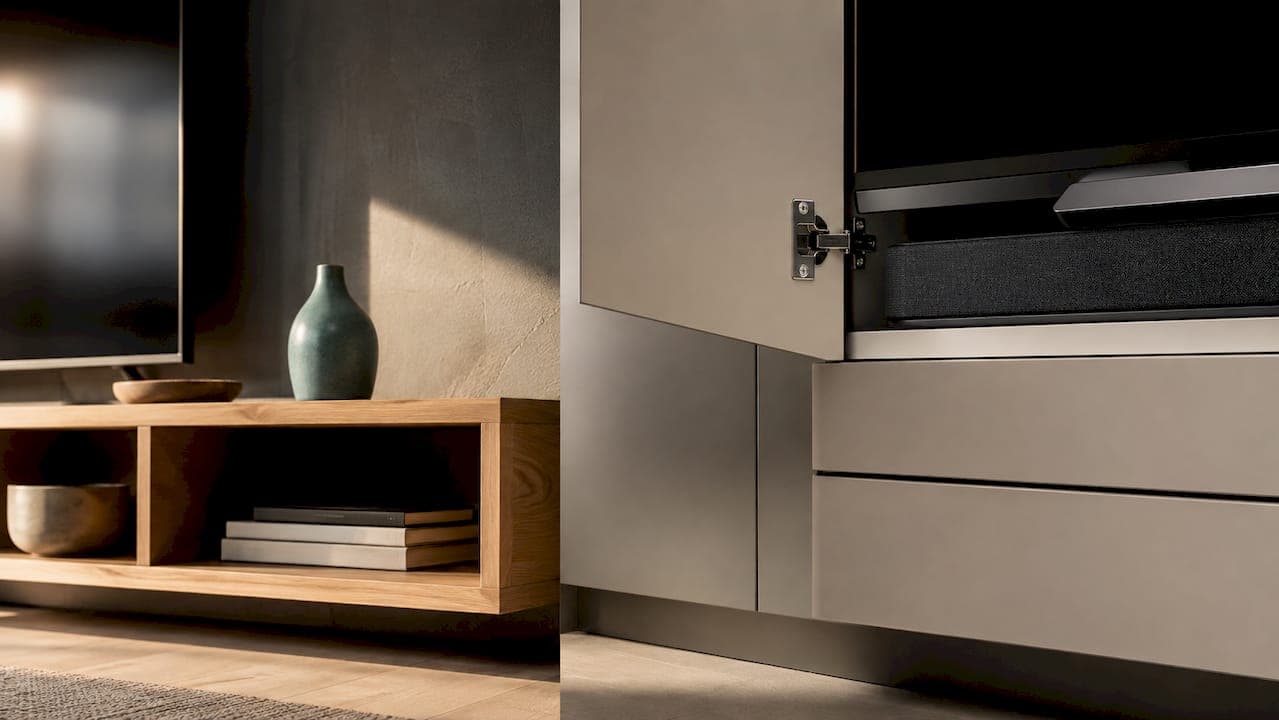
For most living rooms, a cabinet beats an open shelf. Closed storage hides cords, blocks dust, and keeps curious kids and pets away from your gear, which is why it's the default pick for family homes. Open shelves earn their place in minimal setups, curated collector rooms, or apartments where drilling for anchors isn't an option. The comparison below breaks down exactly where each one wins.
TL;DR:
- Cabinets are ideal for hiding multiple devices, managing cords, and protecting electronics from dust and pets, especially in families or pet-friendly households.
- Open shelves suit small rooms or minimalist setups, offering quick access, better airflow, and display space, but require frequent dusting and cord management.
- Proper sizing involves measuring TV width, eye level, device depth, and clearance to ensure balanced, functional placement, with ventilation gaps essential for heat dissipation.
- DIY media wall kits from retailers provide a cost-effective, easy-to-install hybrid solution combining hidden storage with open display, avoiding the expense and wait of custom carpentry.
- Counting devices before shopping determines whether a cabinet or shelf best fits the space, as even floating cabinets can appear light and modern if designed with open-back or vented panels.
Table of Contents
- Shelf vs. Cabinet TV Storage: The Factors That Actually Matter
- The Real Pros and Cons of TV Cabinets
- When Open Shelves Actually Make Sense
- Best Choice by Room Type and Lifestyle
- How to Size and Place a TV Shelf or Cabinet Correctly
- Cable Management and Ventilation Fixes That Actually Work
- Styling and Maintenance Tips for a Setup That Ages Well
- The Media Wall Store's Take on Cabinets, Shelves, and Everything Between
- What I'd Actually Tell a Friend Buying Their First TV Setup
- Get Hidden Storage Without Hiring a Contractor
- Sources
- FAQ
Shelf vs. Cabinet TV Storage: The Factors That Actually Matter
Before you buy anything, run your space against the factors that actually change day-to-day life with the thing. Both a TV console and an open shelf can hold a screen and a soundbar just fine. What separates them is what happens six months later, when the remote batteries die behind a tangle of cords you can't see.
Here's how they stack up:
- Hidden storage: Cabinets win outright. Closed doors and drawers hide gaming consoles, cable boxes, and controllers. Shelves expose everything, all the time.
- Cable management: Cabinets again, thanks to rear cutouts and enclosed backs. Open shelves usually mean visible cords unless you add clips or raceways.
- Dust control: Closed doors keep dust off electronics and vents. Open shelving collects dust faster and shows it sooner, especially on dark finishes.
- Accessibility: Shelves win here. You reach a streaming stick or swap an HDMI cable in seconds. Cabinet doors and drawers add a step.
- Airflow and ventilation: Shelves breathe naturally. Enclosed cabinets can trap heat unless they include vents or a perforated back panel.
- Visual weight and aesthetics: Shelves read lighter and make small rooms feel more open. Cabinets look grounded and formal but can feel bulky in tight spaces.
- Kid and pet friendliness: Cabinets protect cords and remotes from curious hands and paws. Shelves leave everything exposed and within reach.
- Best room type: Cabinets suit family rooms and media-heavy dens. Shelves suit minimalist living rooms, home offices, or curated display walls.
No single factor decides it alone. A gamer with four consoles and two kids under ten has a very different answer than a couple styling a one-bedroom apartment with a single streaming box.
The Real Pros and Cons of TV Cabinets
Cabinets solve the problem most people actually have: too many black boxes and not enough places to put them. A closed console or media wall gives you drawers for controllers, shelves for a router, and doors that hide the cable box's blinking lights entirely.
Cable management is where cabinets earn their keep. Rear cutouts route power cords and HDMI cables out of sight, and a low-profile power strip tucked inside a drawer means you're not staring at a rat's nest every time you sit down to watch something. Dust is also less of a fight. A closed door keeps the interior mostly sealed off, which matters if you've ever pulled a game console out from behind an open shelf and found a layer of gray fuzz across the vents.
For households with kids or pets, cabinets are close to a necessity. A crawling toddler or a curious cat treats exposed cords as chew toys, and a closed cabinet removes that temptation before it becomes a problem. Retailer buying guides consistently point to closed storage as the safer, lower-maintenance choice for exactly this reason.
The tradeoffs are real, though. Enclosed spaces trap heat, and infrared remotes can't punch through a solid cabinet door. Both problems have straightforward fixes:
- Add passive vents or a perforated back panel so heat has somewhere to go.
- Use an IR repeater or switch to a Bluetooth remote if your gear sits behind closed doors.
- Keep the router and any heat-sensitive device on the least enclosed shelf inside the unit.
Pro Tip: Never seal a cabinet completely around a cable box or game console. Even a one-inch gap at the back, or a single louvered vent panel, drops the internal temperature enough to prevent thermal shutdowns during long gaming sessions.
When Open Shelves Actually Make Sense
Open shelves aren't a downgrade. They're a different bet, one that trades hidden storage for lightness and instant access. If your setup is a TV, a soundbar, and maybe one streaming box, you don't need drawers. You need a clean line and a place to display something you actually like looking at.
Design writers note that open shelving makes small rooms feel bigger simply because you can see the floor and wall behind the unit. That visual openness is hard to fake with a boxy cabinet, especially in a studio apartment or a narrow living room where every inch of perceived space counts.
Shelves also win on airflow and quick access. There's no door to open before you swap a game disc or reset a router. Floating shelves in particular pair well with a wall-mounted TV, creating a clean, gallery-style look that a bulky console can't match.
The catch is upkeep. Open shelving rewards curation and punishes clutter immediately. Cords show. Dust shows faster on an exposed surface than inside a closed cabinet. And if you have small kids or a cat that likes knocking things off ledges, an open shelf at grabbing height is asking for trouble.
Consider open shelving when:
- You run one or two devices, not a shelf full of consoles and boxes.
- You want a display element, books, art, plants, alongside the TV.
- Your space is small enough that visual openness matters more than hidden storage.
- You're willing to dust weekly and manage cords with clips or a raceway.
If you like the openness but still have gear to hide, a hybrid unit with open display space on top and closed drawers below solves both problems at once.
Best Choice by Room Type and Lifestyle
The right answer depends less on style preference and more on who actually lives in the room. Match the unit to your household, not the other way around.
- Small living rooms and apartments: A low-profile floating cabinet gives you hidden storage without the visual bulk of a full-size console, which matters when every square foot counts.
- Families with kids or pets: Go with a cabinet, full stop. Closed doors keep cords, remotes, and small parts out of reach, and you'll spend less time chasing a chewed HDMI cable.
- Gamers and multi-device households: Closed storage with a vented back panel handles four or five devices without turning into a tangle of visible cords and blinking lights.
- Decor-forward renters: Floating shelves, or a shelf-and-cabinet hybrid, deliver the styled look without committing to a heavy piece of furniture you'll have to move out later.
- Renters worried about walls: Stick to freestanding cabinets or lightweight shelves mounted with contractor-grade, non-invasive anchors, which avoid the kind of structural drilling that can violate a lease.
None of these are rigid rules. A minimalist with two kids might still choose a cabinet for the safety upside even if the aesthetic leans toward open shelving. The lifestyle factor almost always outweighs the style preference when the two conflict.
How to Size and Place a TV Shelf or Cabinet Correctly
Get the dimensions wrong and even the nicest cabinet or shelf looks off balance, either dwarfing the TV or disappearing underneath it. A few measurement rules keep the proportions right no matter which style you pick.
- Measure your TV's width and add margin on each side. The unit underneath should extend at least 4 to 6 inches beyond the TV on both sides for visual balance. A 65 inch TV, roughly 57 inches wide, wants a console or shelf in the 65 to 70 inch range.
- Check your seated eye-line height. Sit in your usual spot and measure from the floor to eye level. The TV's center should land close to that height, which usually means a shelf or cabinet top sitting 15 to 24 inches off the floor for a standard sofa.
- Match depth to your gear. A soundbar and a cable box typically need 12 to 16 inches of depth. If you're stacking a gaming console and a receiver, look for 16 to 18 inches so doors and drawers still close.
- Leave 4 to 6 inches of clearance behind a wall-mounted TV. That gap lets heat escape and keeps an IR remote sensor unobstructed if you're not using a repeater.
- Confirm weight ratings before mounting a floating shelf. Manufacturer specs for floating shelves typically list capacities in the 30 to 50 pound range when installed into wall studs with proper anchors. Skip the drywall anchors alone if you're hanging anything heavier than a streaming stick.
Getting these numbers right up front saves you from the classic mistake: a console that's too narrow, making the TV look like it's floating off the edge, or a shelf mounted so high that reaching the cable box means standing on the couch.
Cable Management and Ventilation Fixes That Actually Work
Cords and heat are the two problems that make people regret their storage choice six months in. Both are fixable with the same few tricks whether you went with a cabinet or a shelf.
Start with routing. Cable cutouts in the back panel of a cabinet let you run power and HDMI cords through the unit instead of over it. For open shelves, a slim cord raceway stuck to the wall or the underside of the shelf keeps cables from dangling in view. Either way, a low-profile power strip, the flat kind that hugs a wall outlet, beats a bulky surge protector block that eats up half your cabinet floor.
Heat is the quieter problem. Enclosed cabinets can trap warmth around cable boxes and game consoles unless the design includes some form of passive airflow. A perforated back panel, a louvered door insert, or even a simple gap between the cabinet back and the wall solves most of it without adding a fan.
For remotes, closed cabinetry can block the infrared signal your device relies on. IR repeaters solve this by relaying the signal from outside the cabinet to the device inside, and Bluetooth remotes sidestep the issue completely since they don't need a line of sight at all.
- Route power cords through rear cutouts, never across the front of a shelf or cabinet.
- Add a perforated panel or vent gap anywhere devices generate heat.
- Use an IR repeater or Bluetooth remote for anything hidden behind solid doors.
- Keep surge protectors outside fully enclosed drawers to avoid heat buildup.
Pro Tip: Never stack a power strip directly against a game console's exhaust vent inside a closed drawer. That combination is one of the fastest ways to trigger thermal shutdowns during long play sessions.
Styling and Maintenance Tips for a Setup That Ages Well
The unit that looks great on move-in day and the one that still looks great a year later usually differ in one thing: how well it was organized from the start, not how expensive it was.
For open shelving, group items by scale rather than scattering small objects across every shelf. A single oversized vase next to a stack of books reads intentional; five random trinkets read cluttered. Leave visible negative space on at least one shelf, and use a woven basket or fabric bin to corral small electronics like remotes and chargers without them turning into visual noise.

Inside a cabinet, the same organizing principle applies, just hidden. Label bins for cables, controllers, and adapters so a five-minute search doesn't turn into fifteen. A shallow top drawer works well for daily-use items like remotes, while lower cabinets hold the stuff you touch less often. Home organization specialists recommend this kind of zoned storage for exactly this reason: it keeps frequently used items accessible without letting the whole cabinet become a junk drawer.
Maintenance cadence differs by design. Open shelves need a quick dusting weekly since nothing shields them. Closed cabinets need attention monthly at most, though the inside deserves a check every few months to make sure heat and dust haven't built up around vents.
A few finish choices reduce visual bulk regardless of style:
- Light wood tones or matte white finishes read lighter than dark, glossy surfaces.
- Raised legs under a console create a gap of visible floor, which makes even a large cabinet feel less heavy.
- Engineered wood and laminate resist scratches better than solid wood for households with kids or pets, while metal accents add durability to high-touch edges.
The Media Wall Store's Take on Cabinets, Shelves, and Everything Between
Most of the debate around shelves versus cabinets assumes you're picking one or the other. In practice, the best living rooms usually land somewhere in between: a floating cabinet for hidden storage, paired with a slat wall or open display element for texture and visual interest. That's the combination we build kits around.
Floating TV console designs solve the two biggest complaints people have about cabinets: they still look heavy, and they still trap heat. Mounting a cabinet off the floor cuts the visual weight dramatically, and pairing it with a slat panel or vented back keeps airflow moving around anything that runs warm.
A DIY media wall kit makes sense when you want that combined look without hiring a contractor or guessing at measurements yourself. Our kits arrive pre-cut and pre-labeled, with cable routing built into the panel design, so you're not improvising a cutout with a jigsaw on install day. That matters more than people expect. A custom carpenter-built media wall can run into the thousands once you add labor, and the timeline usually stretches past a single weekend.
Where a standalone shelf or cabinet still wins is simplicity. If all you need is a place to put a TV and a soundbar, buying one piece of furniture is faster than assembling a wall system. But once you're trying to hide multiple devices, manage cords across a wider wall, and get a finished look that doesn't scream "flat pack," an integrated kit closes that gap without the custom price tag.
What I'd Actually Tell a Friend Buying Their First TV Setup
Everyone treats this decision like a personality test, minimalists get shelves, everyone else gets cabinets, and that framing misses the actual variable that matters: how much stuff you're hiding, not how you want to feel about your living room.
I've seen plenty of design-forward homes commit to open shelving because it photographed well, then quietly retreat to a cabinet within a year because nobody wants to dust around a cable box every weekend. The reverse happens too. Someone buys a heavy enclosed console for a one-device setup and ends up with an oversized piece of furniture hiding a single streaming stick and a lot of empty space.
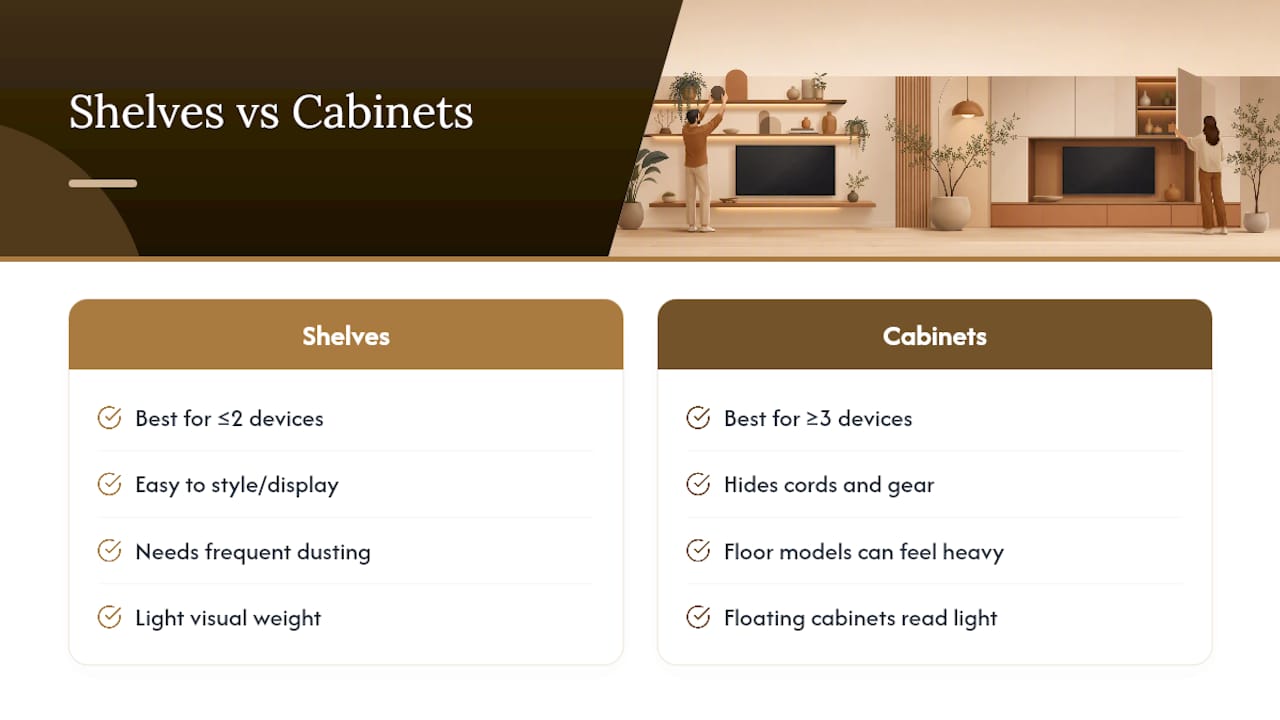
The honest advice is to count your devices before you shop. Two or fewer, a streaming box and maybe a soundbar, and open shelving genuinely works, especially if you enjoy styling a display. Three or more, consoles, a receiver, a router, a cable box, and you'll fight cord clutter constantly unless something closes over it. That threshold matters more than whether your living room leans modern or traditional.
The other thing I'd push back on: the assumption that closed storage always looks heavier. A floating cabinet mounted a few inches off the floor, especially with a slat panel or vented insert, reads just as light as an open shelf. The weight people associate with cabinets usually comes from floor-standing consoles with legs planted directly on the ground, not from closed storage itself. Swap the silhouette, and you keep the hidden storage without the bulky look everyone's trying to avoid.
— Jake
Get Hidden Storage Without Hiring a Contractor
If you've read this far, you already know the tradeoff: cabinets hide the mess but can look bulky, shelves look light but expose everything. A DIY media wall kit from Themediawallstore gets you both, a floating cabinet with built-in cable routing and ventilation, styled with slat panels or accent finishes, without waiting weeks for a custom carpenter or paying custom-build prices.

Every kit ships pre-cut and pre-labeled, so a weekend is genuinely enough time to install it yourself. Over 1,000 customers have gone this route instead of hiring a contractor, and every order comes with expert support and a risk-free return if it's not the right fit for your wall. If you're weighing a standalone cabinet against a full media wall, start by browsing the shop for DIY media wall kits to see finish options, sizes, and pricing before you commit to either path.
Sources
- Sanus — Cable Box Shelf / floating-shelf accessory product page
- Fufugaga — Media consoles vs. shelves for under-TV setups
- HOULTE — TV stands with cabinets vs open shelves
FAQ
What Is the Difference Between a Shelf and a Cabinet?
A shelf is an open, flat surface with no doors or drawers, while a cabinet encloses its contents behind doors or inside drawers. That single difference is why cabinets hide clutter and shelves display it.
Is It Okay to Put a TV on a Shelf?
Yes, as long as the shelf and its mounting hardware meet the weight rating for your TV and any additional devices. Floating shelves typically handle 30 to 50 pounds when anchored into wall studs, so check the manufacturer's spec before mounting anything heavier than a small streaming device alongside the screen.
What Is the Main Difference Between a TV Shelf and a TV Console?
A TV shelf is typically a single mounted or floating surface, while a TV console is a larger, often floor-standing piece of furniture with multiple storage compartments, drawers, or cabinet doors. Consoles generally offer far more hidden storage and cable management than a single open shelf.
What Do You Call a Shelf Under a TV?
It's commonly called a TV shelf, media shelf, or floating console shelf, depending on whether it's wall-mounted or sits on legs. When it includes closed storage instead of an open surface, it's usually called a TV cabinet, media console, or floating TV cabinet.