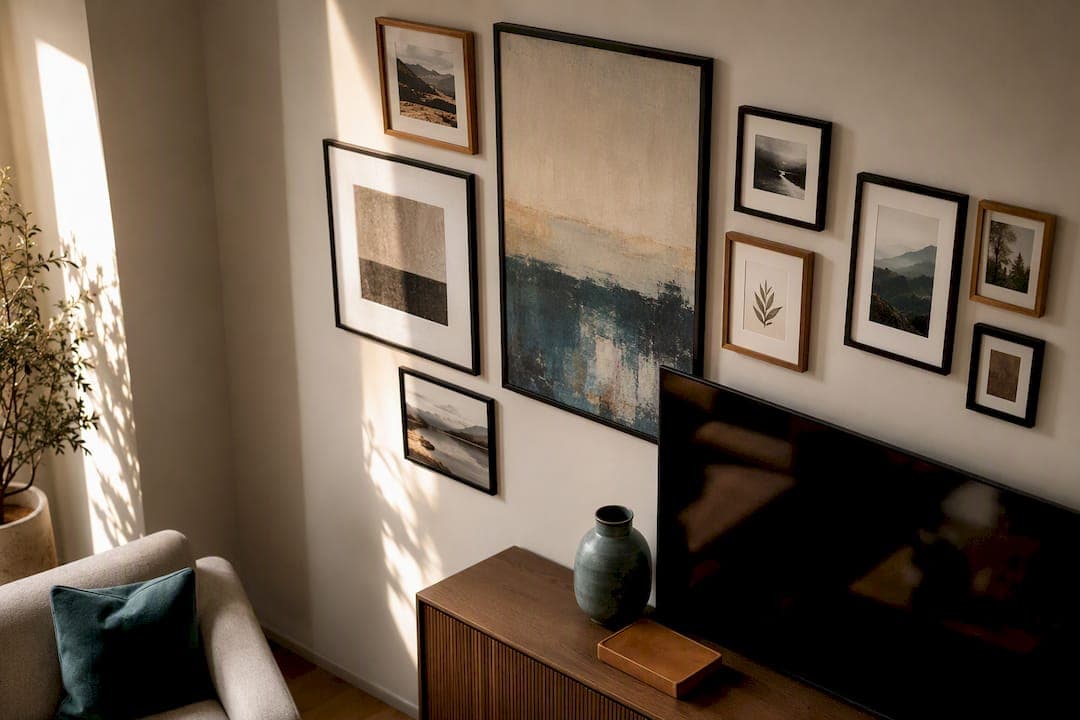
The three approaches that actually work are a gallery wall that folds the TV into a grid of frames, a Frame-style TV running Art Mode so the screen itself becomes the art, and a built-in media wall that treats the television as one panel in a larger structure. Pick the gallery for renters and quick weekend projects, Art Mode when you want the screen to disappear when it's off, and a media wall kit when you want a finished, furniture-grade look. The measurements and installation steps below tell you exactly how to pull off whichever one fits your room.
TL;DR:
- Most living rooms require a gallery wall that spans about 1.2 to 1.5 times the TV's width, typically 68 to 86 inches for a 65-inch TV.
- When mounting the TV at eye level, the center should be about 40 to 44 inches from the floor, adjusted for seating height.
- Art Mode on smart TVs or physical framing options can make the screen blend into the decor, but fixed art complements are best for budget-conscious setups.
- Built-in media walls need careful planning for wiring and ventilation, with a typical panel size of the TV width plus 8 to 16 inches on each side.
- Pre-made media wall kits offer a DIY alternative to custom carpentry, delivering a finished look in a weekend without a contractor’s timeline.
Table of Contents
- Building a Gallery Wall Around Your TV
- Getting the Height, Spacing, and Sightlines Right
- Turning the TV Itself Into the Art
- Built-Ins, Slat Panels, and Media Wall Kits
- Styling the Space Around the Screen
- Hanging Art Around a TV Without Guesswork
- Why Media Wall Kits Solve the "Custom Look, DIY Budget" Problem
- Smart TVs and Digital Art Displays
- Choosing Frames and Mats That Don't Compete With the Screen
- Five Steps Before You Touch a Drill
- Get a Finished Media Wall Without Hiring a Contractor
- Sources
- FAQ
Building a Gallery Wall Around Your TV
A gallery wall works because it stops treating the television like an intruder and starts treating it like one more rectangle in the composition. The trick is choosing a layout that has enough visual weight to compete with the screen, then following a few sizing rules so it doesn't look like an accident.
Four layouts cover most living rooms. A grid layout uses same-size frames in even rows and columns, which reads as calm and modern, and it's forgiving if you're new to hanging art. A salon-style cluster mixes frame sizes and orientations for a livelier, collected-over-time feel, best when you already own a stack of mismatched art. Symmetrical flanking puts identical or matching pairs on either side of the TV, which is the safest option if the television sits dead center on the wall. An off-center arrangement shifts the whole grouping to one side, useful when the TV isn't centered or when a doorway or window eats into the wall.
Sizing is where most people guess wrong. Interior designers generally recommend making the full gallery about 1.2 to 1.5 times the width of the TV, so a 65 inch television (about 57 inches wide) calls for a gallery spanning roughly 68 to 86 inches. A gallery too close to the TV's own width leaves it looking like an island rather than part of the wall.

Keep gaps between frames consistent, generally 2 to 3 inches, and favor odd numbers of pieces (three, five, seven) since odd groupings tend to photograph and read better than even ones. Matching frame finishes, even when the art inside varies, helps the eye treat the whole thing as one unit instead of a scattered collection.
Pro Tip: Pick frames in matte black or a warm wood tone close to your TV's bezel color. When the frames echo the screen's own finish, the TV recedes into the grouping instead of standing out as the odd shape in the group.
Renters have real options here too. Picture ledges let you lean and layer frames with zero drilling, peel-and-stick tiles hold lightweight prints without wall damage, and painter's tape mockups (more on that later) let you test a full layout before a single nail goes in.
Getting the Height, Spacing, and Sightlines Right
Before you hang anything, the math matters more than taste. Get the numbers wrong and even a beautifully chosen gallery will feel off.
Start with eye level. A widely used rule places the center of the screen around 40 to 44 inches from the floor for a typical seated viewer, which lands lower than most people instinctively mount a TV. If your sofa sits unusually low or high, adjust from there rather than defaulting to a standard number.
Screen size and seating distance are linked by a simple formula: divide your seating distance (in inches) by 1.6 to 2 to estimate a comfortable diagonal screen size. A sofa 10 feet (120 inches) from the wall suggests a screen somewhere between 60 and 75 inches diagonal.
Your console matters too. Aim for a stand at least as wide as the TV, ideally 10 to 20% wider so the television doesn't visually overhang its base. A 71 inch floating console under a 65 inch TV gives that extra margin without looking oversized.
Here's how gallery width and console width scale by common TV sizes:
Leave at least a few inches of clearance behind and above any enclosed AV equipment so components don't overheat, and keep a soundbar 4 to 8 inches below the screen so it doesn't block the bottom edge of the picture.
Turning the TV Itself Into the Art
Some homeowners skip the gallery altogether and let the screen do double duty. Samsung's Frame TV line runs Art Mode, which displays curated artwork or your own uploaded photos when the TV isn't playing anything else. Owners pick images, choose a matte style, and adjust brightness and color tone either on the TV itself or through the SmartThings app, and the display dims to blend with ambient light so it reads more like a print than a screen.
If you don't own a Frame TV, you can approximate the look with physical framing:
- Slim faux frames clip onto the bezel of an existing TV and read as a picture frame from across the room.
- Wood moulding built directly onto the wall around a recessed or flush-mounted screen creates a built-in frame effect.
- Floating bezel inserts add a shadow-box edge that mimics gallery framing without permanently altering the TV.
Lighting changes the effect more than most people expect. A picture light mounted above the screen makes it read as a framed piece rather than a blank rectangle when it's off. Bias lighting behind the TV, generally around 6500K, reduces eye strain while viewing and makes the screen edges disappear into the wall rather than glowing starkly against a dark room.
Art Mode and its clones make the most sense for people who want a genuinely flexible, ever-changing display. If you'd rather commit to a fixed look and skip the tech, surrounding the screen with physical art and a gallery wall gets you most of the same visual payoff for less cost.
Built-Ins, Slat Panels, and Media Wall Kits
Structural integration is the highest-commitment option, and it's also the one that looks most intentional once it's done. A recessed niche sinks the TV into the wall so it sits flush rather than proud, a slat panel wall gives the whole area texture and rhythm, and a media wall box frames the television inside a defined architectural feature rather than leaving it floating on open drywall.
Proportion still rules here. A common guideline sizes the panel or niche at the TV's width plus 8 to 16 inches on each side, giving the screen breathing room without making the structure feel oversized for the wall.
Two things trip people up on built-ins: wiring and airflow. Plan wire channels before you close up any panel, not after, and leave real ventilation space for receivers, streaming boxes, or game consoles that generate heat behind a closed cabinet.
- Recessed niches flush-mount the TV for the cleanest, most custom look.
- Slat panels add texture and can run the full width of the wall, TV included.
- Sliding or pivoting panels let you hide the screen entirely when it's not in use, a tactic designers use often in formal living rooms.
Hiring a carpenter for a fully custom build usually means weeks of lead time and a price that reflects bespoke labor. A pre-cut kit compresses that into a weekend, with panels already sized and labeled for assembly.
Pro Tip: If you're mounting above a fireplace, keep the tilt angle within a comfortable viewing range and consider a niche that lowers the screen slightly rather than mounting it flush against a tall mantel; a steep upward viewing angle gets uncomfortable fast during long movies.
Styling the Space Around the Screen
Once the TV and its frame or gallery are settled, the furniture and objects around it decide whether the wall looks finished or half-done. A low console generally works best under a wall-mounted TV, while a mantel-height shelf suits a room built around a fireplace. Shelves flanking the screen typically run 12 to 16 inches deep, and a console beneath the TV works better around 18 to 24 inches deep to hold components without crowding the floor.
Backdrop color does real work too. A dark accent wall or black slat panel makes the bezel of an off television visually disappear instead of standing out as a glossy black rectangle against a light wall. Wallpaper or a textured panel behind the screen adds enough visual interest that your eye reads "wall feature" first and "television" second. If you want specific color direction, a living room accent wall guide breaks down shades that pair well with common TV bezel finishes.
On open shelves, resist the urge to fill every inch. Leave negative space, group objects in threes or fives, and rotate a few pieces seasonally so the display doesn't go stale. A mirror placed to one side of the TV bounces light and pulls the eye away from the screen, and a floor plant or two softens the hard edges of electronics and frames alike.
Pro Tip: Stand ten feet back before you finalize shelf styling. If your eye goes straight to the clutter on the shelf instead of the room as a whole, pull a third of the objects off and start again.
Hanging Art Around a TV Without Guesswork
Getting a gallery level and evenly spaced on the first try almost never happens by eye alone. A few low-tech tricks fix that before you drill a single hole.
- Cut paper templates the exact size of each frame and tape them to the wall in your planned layout, adjusting spacing until the arrangement looks right.
- Use the painter's tape trick: measure the hanger position on the back of each frame, transfer that exact spot onto a strip of painter's tape on the wall, and drill through the tape so your hook lands exactly where the hanger needs it.
- Find your studs first with a stud finder, especially for anything heavier than a lightweight print, and mark them lightly in pencil before placing tape.
- Route cables using an in-wall cable kit, a recessed power outlet behind the TV, or a paintable cord cover if you're renting and can't cut into drywall.
- Leave soundbar clearance of about 4 to 8 inches below the screen and label every cable at both ends before you push everything back against the wall.
Why Media Wall Kits Solve the "Custom Look, DIY Budget" Problem
Custom carpentry gets you exactly what you want, eventually, at a price that reflects skilled labor and a build timeline measured in weeks. Pre-cut, pre-labeled DIY media wall kits close most of that gap, delivering a comparable finished look with parts sized for a weekend assembly rather than a contractor's schedule.
A typical kit includes slat wall panels, integrated LED lighting, and floating cabinetry with wire channels already accounted for, so you're not improvising cable management after the fact. Choosing between kit options usually comes down to three questions: what finish matches your existing trim and furniture, whether you want built-in lighting or plan to add your own, and whether a fireplace insert makes sense for your layout. Media wall kit design options walk through several finished examples if you want a visual sense of what's achievable before ordering.
Smart TVs and Digital Art Displays
Art Mode isn't limited to a single product anymore. Most current smart TVs offer some version of an ambient or screensaver display, whether that's a dedicated art mode, a photo slideshow pulled from cloud storage, or a third-party app that rotates curated paintings and photography when the TV sits idle.
The appeal is flexibility. You can swap the "art" on your wall seasonally, match it to a room's mood, or sync it to your own photo library without touching a single frame. The tradeoff is cost and commitment to a specific ecosystem; a Frame-style TV or a smart TV with strong ambient display features usually costs more than an equivalent model without it, and the effect only works when the TV is powered and connected.
For homeowners who split the difference, a hybrid approach works well: run a digital display through slower hours of the day and lean on physical art and a gallery wall as the permanent, always-there layer around the screen. That way the room still looks complete even if the TV is unplugged, in for repair, or simply off for the weekend. Digital art adds motion and variety; physical art guarantees the wall never looks unfinished.
Choosing Frames and Mats That Don't Compete With the Screen
Glare is the enemy of any gallery hung near a television. Glossy frame glass or glass matting catches light from windows and from the TV itself, creating distracting reflections that pull focus away from both the art and the screen.
Look for non-glare or museum-grade acrylic glazing on any piece hanging within a few feet of the TV, especially on the wall directly facing a window. Matte paper prints, canvas, or framed pieces with no glass at all sidestep the glare problem entirely, which is part of why canvas prints are common choices for gallery walls built around a TV.

Matting color matters more subtly. A bright white mat next to a black TV bezel creates a hard contrast that draws the eye straight to the seam between art and screen. A cream, warm gray, or black mat softens that transition and keeps the eye moving smoothly across the whole wall instead of snagging on one bright edge.
Frame finish follows the same logic as the gallery advice above: matte black, brushed metal, or warm wood tones generally blend better with a TV bezel than high-gloss or mirrored frames, which can throw reflections across the room depending on the light. If you're sourcing prints specifically for this kind of display, a source like Brittany Clare Art offers modern prints sized well for gallery groupings around a screen.
Five Steps Before You Touch a Drill
Measure sightlines first, then mock up your layout with taped paper templates. Settle your wiring and ventilation plan before anything gets mounted. Pick a backdrop and order frames or a kit. Install last, and leave room to breathe.
— Jake
Get a Finished Media Wall Without Hiring a Contractor
Themediawallstore is the alternative to hiring a carpenter for a custom TV wall: the kits arrive pre-cut and pre-labeled, so a weekend of assembly gets you the slat paneling, floating cabinetry, and hidden wire channels a custom build would otherwise take weeks and a much bigger budget to deliver. Many customers have used these kits to get a finished, gallery-ready TV wall without waiting on a contractor's schedule.
If you already know the look you want, browse the media wall kits to see finishes and layouts, including options like the Monaco kit with its floating console and slat display tower. Not sure where to start? The Single Concept Design service gets you a tailored layout for $99, and if you'd rather compare a few directions before committing, a design package covers that. Head to the shop page and pick the starting point that matches how much guidance you want.
Sources
- 41 Ideas for Decorating Around a TV That Will Help It Blend In
- 12 Stylish Ways to Decorate Around Your TV
- How to use Art Mode on the Samsung Frame TV
FAQ
What are some creative ways to decorate around my TV?
Building a gallery wall that includes the screen, mounting the TV in a slat panel or recessed niche, and adding floating shelves with plants or books on either side all work well. A dark accent wall or bias lighting behind the screen also helps it blend into the room instead of standing apart from it.
How do I get art on my TV screen?
A Frame-style TV with Art Mode is built for this: you upload images or choose from a curated library, then set the matte style and color tone so the screen displays artwork when you're not watching anything. Many current smart TVs offer some version of an ambient display mode even without dedicated Frame hardware.
How do I decorate on either side of a TV?
Flank the screen with matching shelves or a symmetrical pair of framed pieces to create balance, keeping shelf depth around 12 to 16 inches so they don't crowd the wall. Odd-numbered groupings of books, art, and small objects on each side tend to look more intentional than a perfectly even split.
How can I turn my TV into framed art?
A slim faux frame that clips onto the TV bezel or wood moulding built around a flush-mounted screen creates a framed look even without Art Mode. Pair that with a picture light above the screen and matte, non-glare framing nearby so the whole area reads as a cohesive gallery rather than a screen with some art around it.
How much does a media wall kit cost?
Pricing for Media Wall Kits is listed on the shop page and varies by finish, size, and features like integrated lighting. Design help starts at $99 for a Single Concept Design if you want a layout plan before choosing a kit.