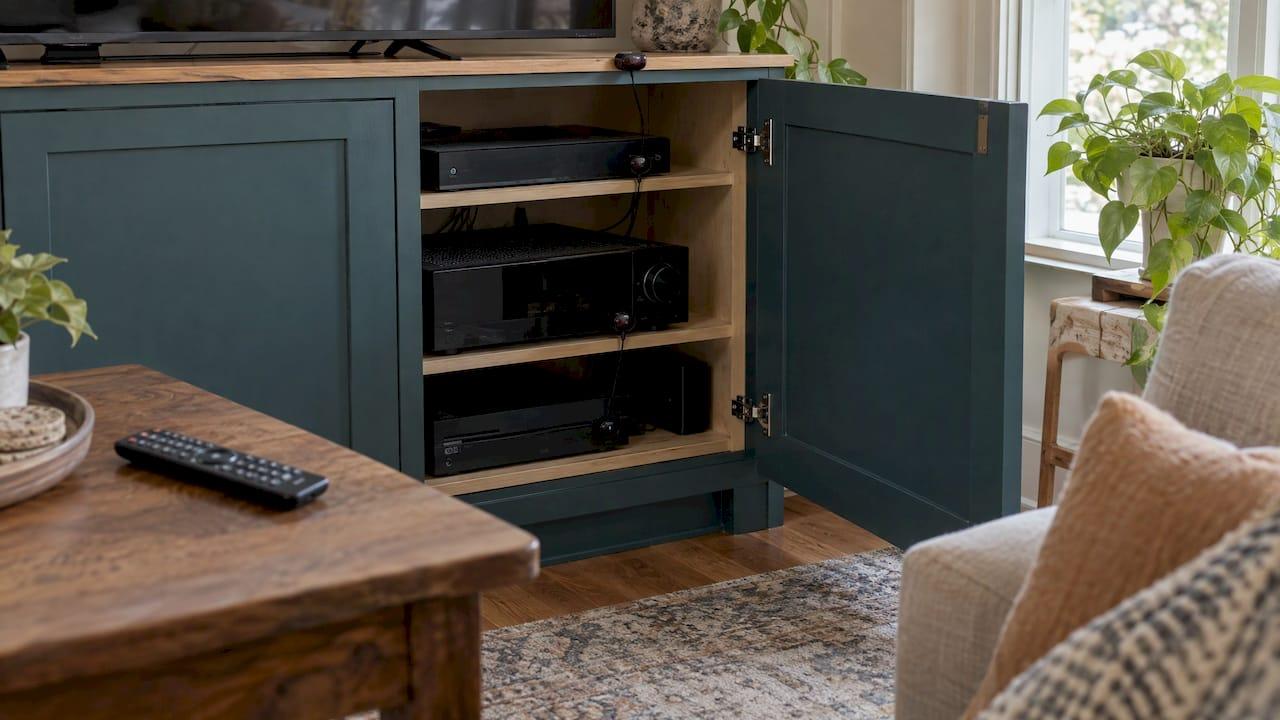
You can control equipment behind a closed cabinet door with a hidden IR repeater: a small receiver sits where your remote can see it, and thin wired emitters inside the cabinet repeat each button press to the devices. Infrared light does not travel through wood, so the receiver has to be somewhere visible, but it can be a tiny sensor on a shelf edge or under a speaker grille instead of an open door. The best moment to plan it is before the cabinet or media wall is closed up, because the wire path, the ventilation and the access to the gear all depend on the same decisions.
TL;DR
- Infrared from a remote bounces off cabinet doors and walls but does not pass through them, so a closed door needs a repeater or an in-cabinet blaster.
- A repeater kit has three parts: a receiver (the sensor your remote points at), a hub that distributes the signal, and emitters that stick over each device's IR window.
- Mount the receiver in line of sight of where you sit, and keep it away from plasma screens, strong lamps and sunlight.
- Enclosed equipment gets hot. Plan vents or thermostatic fans at the same time as the IR path.
- Run the wire and leave an access panel during the build, not after the drywall is finished.
Table of Contents
- Why a closed cabinet blocks your remote
- Three ways to control hidden gear
- What is in a hidden IR repeater kit
- How to install it, step by step
- Plan the IR path with your ventilation
- When it does not work: troubleshooting
- Our perspective
- Build it into your media wall
- FAQ
- Sources
Why a closed cabinet blocks your remote
Most remotes work by flashing infrared light at a small window on the front of a device. That light behaves like a flashlight beam: it cannot penetrate walls, doors or cabinets, so a receiver hidden behind solid wood never sees the signal. Glass doors sometimes let a signal through, but a solid door, a drawer front or a panel on a media wall will not.
That is why the usual symptom is easy to spot: the device responds when the door is open and ignores you when it is closed. If that is what you see, the path is blocked and a repeater or blaster solves it. If the device ignores the remote even with the door open, the problem is somewhere else, such as batteries, the wrong remote code or a device that does not use IR at all.
Some equipment is controlled by radio frequency (RF) or Bluetooth instead. RF passes through walls, doors and cabinets, so those devices do not need a repeater. Check your remote's manual before you buy anything. If it says RF, you may already be done. If it says IR, or you are not sure, read on.
Three ways to control hidden gear
There are three practical approaches. Which one fits depends on how many devices you hide and how clean you want the front of the cabinet to look.
A hidden IR repeater kit
This is the standard answer for a built-in cabinet or media wall. A receiver (also called a sensor or target) catches the signal from your existing remote. It passes it down a cable to a hub, and the hub feeds emitters, each stuck over the IR window of one device. One manufacturer's manual describes a kit that controls up to eight components behind closed doors or walls, using four dual-output emitter cables that each serve two devices. Smaller kits handle four to six.

The upside is that you keep the remotes you already own. The receiver can be small enough to hide under a shelf lip or behind a speaker grille, and the cable can travel a long way, so the gear can sit in a closet or another room.
An IR blaster inside the cabinet
A blaster is a high-output emitter that floods the inside of the cabinet with infrared, so one unit can reach several devices at once. According to Sound & Vision's installer guide, single emitters control one device, dual-head emitters control two, and blasters cover several. Blasters are common with universal remote hubs. Logitech's guidance is to place the hub in the largest open space in the cabinet and put the blasters on separate shelves, because IR bounces around inside but cannot get out through the door.
A blaster is fine for a small cabinet. In a deep media wall with several compartments, direct emitters on each device are usually more reliable, because a blast can hit the wrong box.
An RF or smart-hub remote
If you are replacing remotes anyway, an RF remote or a hub-based universal remote removes the line-of-sight problem. It still needs an IR blaster for any device that only understands infrared, so many homes end up with a hybrid: hub plus a couple of emitters.
What is in a hidden IR repeater kit
Kits look different on a product page, but the parts are the same:
| Part | What it does | Where it goes |
|---|---|---|
| Receiver (sensor or target) | Catches the signal from your remote | Where you can see it from the sofa |
| Connecting block or hub | Takes the signal and splits it to several outputs | Flat surface inside the cabinet |
| Emitters | Tiny transmitters that repeat the signal | Stuck directly on each device's IR window |
| Power adapter | Powers the hub | A power strip inside the cabinet |
Two specs matter when you compare kits. The first is receiver range: roughly 25 to 40 feet is typical for consumer kits, which is plenty for a living room. The second is the number of outputs, which sets how many devices you can hide. Buy for the number you own plus one or two spare, because a soundbar, streamer or game console tends to appear later.
Also check that your gear is IR-controlled. Equipment that uses another control method, such as some premium brands' proprietary systems, cannot be operated by IR extenders at all.
If the cabinet itself is still on your shopping list, a unit with closed compartments and room behind it for the hub makes the install easier. A TV stand like these TV units with closed storage shows the kind of layout where components sit behind doors and the receiver needs to live on the front edge.
How to install it, step by step
The job suits a patient DIYer. Sound & Vision's installer describes it as simple: find the sensor window on each device, stick the emitter over it, and if it does not work, you are just in the wrong spot. Here is the full sequence with the places it goes wrong.
- Find each device's IR window. It is a small dark or red dot, often about 1/8 inch across, behind the front panel. The manufacturer manual suggests shining a flashlight through the front to locate it. Where it goes wrong: devices with the sensor behind a thick tinted panel hide it well. Check the device's manual for the marked location.
- Stick an emitter over each window. The emitter is about the size of a pinky fingernail and attaches with adhesive tape. Keep it centered on the sensor. If the cable is too short, use a standard extension cable. Where it goes wrong: an emitter placed an inch off to the side will work some days and not others.
- Place the hub. Put the hub on a flat surface in the cabinet within reach of every emitter cable, usually a few feet. Plug it in. Where it goes wrong: putting it behind the hottest component. Give it airflow.
- Mount the receiver. It must be in line of sight of the remote, so it goes on a shelf, an exposed part of the cabinet or behind a speaker grille. Keep it at least a foot from the TV, because the screen can cause interference. Where it goes wrong: a spot where a lamp or window light hits it. Bright ambient light cuts range.
- Connect and test one device at a time. Point the remote at the receiver, close the door and try each function. Most receivers have a small LED that flashes to confirm the signal arrived.
- Tidy the cables. Bundle the emitter leads along the cabinet back, leaving slack for pulling a device out.
A longer cable run is possible too. The receiver's signal can travel over standard network cable for hundreds of feet, which matters if the gear lives in a closet instead of behind the TV.
Plan the IR path with your ventilation
Hiding equipment in an enclosed space creates a heat problem, and it is easy to solve the IR and forget the airflow. A cabinetmaker writing in a woodworking forum advises planning cooling vents and temperature-controlled fans before the cabinet is built, and telling the owner whether components use IR or RF, because a later equipment change can break the setup. The installation manual for one repeater kit gives the same warning: high-powered amplifiers and receivers may overheat in an enclosed cabinet, so read each component's manual before you box it in.
Our own guides cover the airflow side in detail: how to plan thermostatic fans before the finish goes on and fixes for TV ventilation in a cabinet. Read them alongside this one, because the receiver, the hub and the fan all want the same few inches of space.
Two other planning choices save you trouble later:
- Leave access. Emitters come loose, batteries in remotes die and you will add a device one day. A properly placed access panel lets you reach the hub without taking anything apart.
- Plan the cables. The receiver lead, emitter leads and power all need a route. This is easiest while the wall is open. Our guide to hiding every cable in a floating media cabinet walks through that routing.
When it does not work: troubleshooting
Most failures come from placement, not from a faulty kit.
- Device responds with the door open but not closed. The IR path is blocked. Check that the receiver is exposed and that the emitter is directly on the device's sensor.
- Works from close, fails from the sofa. Range drops in bright light. The installation manual advises protecting the receiver from plasma screens, strong radio-frequency sources and direct sunlight or bright lamps. Move it, or shade it.
- Works for some devices only. Test each device individually. In a cabinet with several compartments, a hub placed too far back may not reach everything. One reviewer fixed a projector that would not respond simply by moving the hub to the front of the rack.
- Two boxes react to one button. In most repeater setups every emitter receives every command. That is fine unless you own two of the same type, such as two receivers or two players, which can respond together. Use a separate remote code for one of them, or a second repeater zone.
- A function never works. A repeater cannot fix a wrong command setup, or control something that uses a different control method. Confirm the remote controls the device correctly with the door open first.
Fix one thing at a time, and test after each change. Placement is usually the answer.
Our perspective
We build media walls, and the pattern is the same every time: the screen gets all the attention and the gear behind it gets planned last. Then the owner closes the wall and finds the soundbar ignores the remote.
Hidden IR control works well, but only when it is part of the layout from the start. Decide where the receiver lives, where the hub sits and how the cables run before you fasten a single panel. Our kits are pre-cut and pre-labeled, with hidden wire management built in, so there is a planned route for those leads instead of a hole drilled afterward.
Give the gear room to breathe, leave a way in, and pick a finish you love. A media wall that looks high-end and still works with the remote you already own is not hard to achieve. It just needs the plan to come first.
Jake
Build it into your media wall
If you are planning a media wall and want the equipment hidden from day one, we sell DIY media wall kits with pre-cut, pre-labeled panels, floating cabinetry and hidden wire management, designed for a weekend install without a contractor. You can also browse our audio and visual accessories when you choose components.
If you want a layout drawn for your own wall first, our design services start at $99 for a single concept, with a 3 concepts and revision package at $199 and a full design and quote at $299. In the SF Bay Area we also offer white-glove installation.

FAQ
Can infrared go through a cabinet door?
No. Infrared behaves like light, so it bounces off a solid door instead of passing through it. A repeater moves the receiver to a visible spot, or a blaster puts an IR source inside the cabinet next to the equipment.
How many devices can one hidden IR system control?
It depends on the kit. Common consumer kits control four to eight components, and some can be expanded. Count what you own and add a spare or two, then check that each device actually uses IR.
Where should the IR receiver go?
Put it where your remote can see it from your usual seat: a shelf edge, an exposed part of the cabinet or behind a speaker grille. Keep it at least one foot from the TV and away from bright lamps and sunlight.
Do I still need ventilation if the gear is hidden?
Yes. Enclosed equipment holds heat, especially amplifiers and receivers. Plan vents or a thermostatic fan when you design the cabinet, and check each component's manual for its clearance needs.
Sources
- How To Point Your Remote, Logitech Harmony support
- What Is an IR Pass-Through?, Techwalla
- Remote Control Through Closed Doors, WoodWeb
- The Custom Installer: How to Install an IR Repeater, Sound & Vision
- Hidden IR Repeater System manual
- Sofabaton X1S Universal Remote Review, CE-Sphere