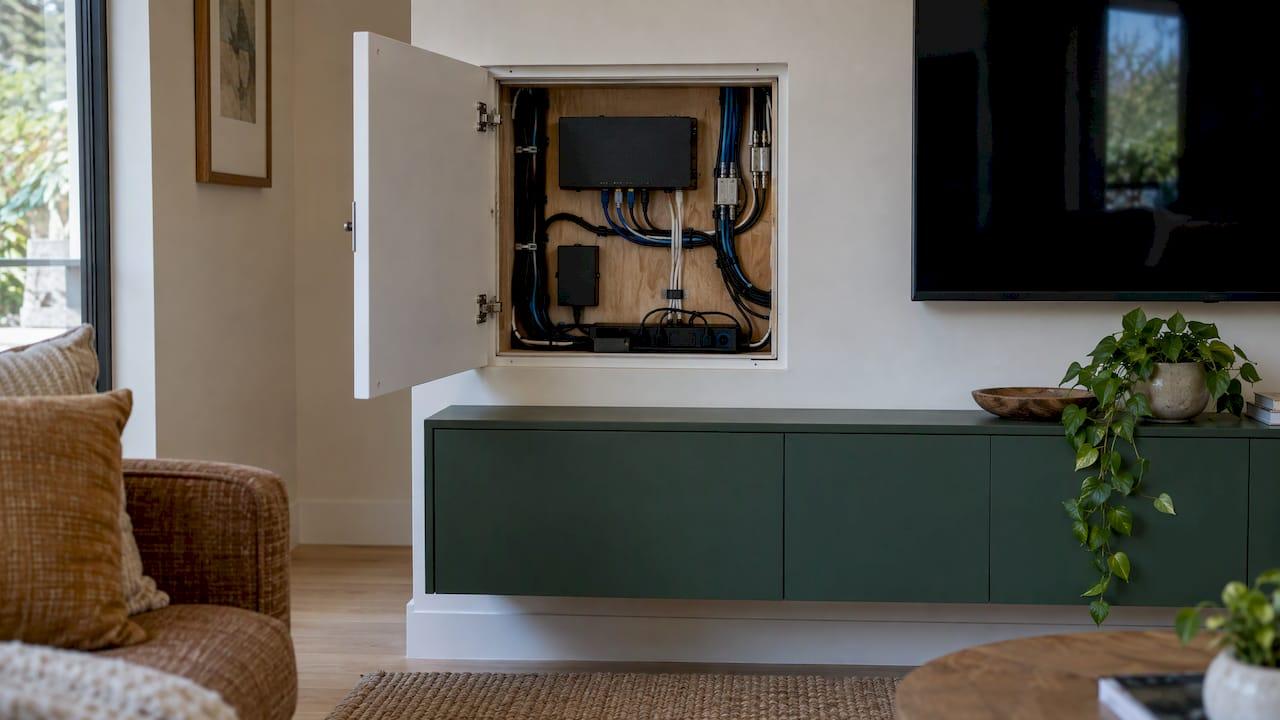
A media wall needs at least one way back to what sits behind it. Plan the access panel before you build: put it where your power, low-voltage connections and any junction box can be reached without removing finished drywall, and keep it away from structural framing. Do that at the design stage and the panel disappears into the finish. Add it later and you are cutting into a wall you have already painted.
This guide covers what the panel is for, what the code expects to stay reachable, where it goes, which kind to pick, and how to install it neatly.
TL;DR
- An access panel is a removable cover that gives you a way to service the power, cables and connections hidden inside your media wall.
- Boxes and connections must stay reachable. The National Electrical Code (NEC) does not allow covering a junction box so that reaching it means removing part of the building, and drywall counts as part of the building.
- Plan the panel during design: near the equipment zone, between studs, clear of joists, trusses and other structural members.
- Choose the cover by its job: a round or square drywall panel for service access, a recessed low-voltage plate or in-wall box for cable pass-through.
- Never run a TV power cord or extension cord inside the wall, and use a licensed electrician for any new receptacle.
Table of Contents
- What an access panel does in a media wall
- What the code expects you to keep reachable
- Where to put the access panel
- Choosing the right type of panel
- How to install an access panel without wrecking the finish
- Can you add an access panel to a media wall that is already built?
- Cable and power safety behind the panel
- Our view on access panels
- Plan the wall with the access point built in
- FAQ
- Sources
What an access panel does in a media wall
A media wall hides a lot: power, HDMI and network runs, a soundbar feed, LED lighting drivers, sometimes a streaming box. Hidden is good until something fails. A connector loosens, a low-voltage transformer dies, or you upgrade a TV and need to swap a cable. Without a way in, the fix is a drywall repair.
An access panel is the answer. Drywall panel makers describe these covers as a way to reach service areas such as plumbing, electrical, security systems, telephone and computer cables. In a media wall the relevant ones are the electrical and low-voltage runs, and the panel is simply the part of the finished surface that comes off.
There are two related jobs, and people often mix them up:
- Service access: a removable section so you can reach boxes, transformers, drivers and cable bundles.
- Cable pass-through: a plate or in-wall box that lets cables leave the wall at the TV or equipment shelf without a visible hole.
Most media walls benefit from planning for both, and they are often placed close together.
What the code expects you to keep reachable
This part is a safety matter, not a style choice. A county building guide on ceiling access panels states that access panels are required for concealed electrical junction boxes, low-voltage transformers and recessed lighting components, so they can be troubleshot or repaired later, and ties this to the NEC "readily accessible" requirement. The same guide advises making sure an access opening does not compromise structural members, and it lists extra requirements when joists or trusses have to be cut.
A Q&A thread citing NEC 314.29 makes the same point in plain terms: boxes must stay accessible, and covering one with drywall, which counts as part of the building, breaks that rule. Treat it as background and confirm the details with your local building department, because adopted code editions and local amendments differ by city and county.
Practical translation for a media wall:
- If a junction box ends up behind finished wall or panel material, it needs a removable cover in front of it.
- Low-voltage transformers for LED strips belong behind a panel you can actually remove.
- If you are unsure whether something counts, ask your local building department or a licensed electrician before you close the wall.
Our own guide on two legal ways to power a wall-mounted TV under the NEC goes deeper on power, and our piece on outlet placement for a media wall helps you decide how many receptacles to plan for.
Where to put the access panel
The best location is the one you will actually be able to reach with the TV and furniture in place. Work through these questions in order.
Start from the equipment zone
List what is hidden: receptacles, the low-voltage plate, the LED driver, any streaming device or cable box. The panel should sit where it reaches the most of them. Commercial media wall systems typically place the removable panel above or below the media, close to the technology it serves, rather than somewhere that needs a long reach.
Respect the framing
In wood-framed walls, studs are usually on 16-inch centers. An in-wall accessory box, for example, is made to fit between 16-inch wood stud centers when mounted vertically. Use the same logic for any opening: find the studs, size the opening to the bay between them, and never cut through a stud or plate for a cosmetic reason. In a ceiling or a wall carrying load, follow the county guide's caution about structural members.
Keep it behind something movable
The cleanest media walls hide the panel behind a floating console, a shelf or the TV itself. A low panel behind a floating cabinet is invisible and easy to reach. A panel directly behind a mounted TV works only if you are willing to take the TV down each time, which is fine for rare service but a poor choice for a box you touch monthly. If you want shelving and cabinetry that suits this approach, look at media wall cabinetry designed for safe TV mounting before you fix your layout.
Allow room for hands and cables
A hole big enough to see through is not always big enough to work through. Leave space to reach in, and keep the opening clear of bulky cable bundles. A service loop of spare cable inside the wall makes later swaps far easier.
Choosing the right type of panel
No single product suits every wall. Match the cover to the job.
| Type | Best for | Things to know |
|---|---|---|
| Round drywall access panel | Reaching a junction box or a low-voltage transformer | Spring-loaded clips hold it; one maker's spec says it needs no framing, screws or latches and suits walls up to 3/4 inch thick |
| Square or rectangular drywall panel | Larger service openings, cable bundles | Choose a paintable, flush design so it blends with the wall |
| Magnet-held removable panel | Media wall surfaces with a clean, seamless look | Commercial systems pair hooks with recessed rare-earth magnets so the panel lifts off without tools |
| In-wall accessory box | Concealing power and low-voltage connections behind a flat panel TV | One datasheet gives a usable space of 13.10 x 9.60 x 3.76 inches and a stated 25 lb maximum load |
| Recessed low-voltage plate | Cable pass-through at the TV or shelf | Single- or double-gang; a recessed plate sits deeper for a flat profile |
Match the size to the wall thickness
Standard drywall is thinner than many media wall builds. Panel-covered walls, slat panels and built-out frames add depth, so check the stated thickness range of any panel before buying. A cover rated for 3/4 inch will not seat properly in a thicker build-up.
Finish matters
A paintable face lets the cover take the same finish as the wall around it. For a wall with slat panels, veneers or wallpaper, plan the cover so its seam falls on a pattern line or shadow gap rather than in the middle of a clear surface.
How to install an access panel without wrecking the finish
The steps below suit a drywall wall. For a purpose-built media wall, the best time to do this is before the final surface goes on.
1. Plan the route and the opening
Mark where cables run, where the boxes are and where the panel goes. A hidden-cabling guide recommends planning routes first and cutting access holes at the destination equipment and outlet areas, with intermediate openings for long horizontal runs. Where it goes wrong: people skip the plan, cut where it is convenient and find the cable path is blocked by a fire block or stud.
2. Turn off power and check what is inside
Shut off the breaker for any circuit behind the area and confirm it is dead. Use a stud finder and look inside with a small camera or flashlight through a pilot hole before you cut. Where it goes wrong: cutting blind into a live cable.
3. Cut the opening
The maker's directions for a round panel say to cut the opening with a drywall saw, and you can use the panel's inner circle as a template. For wall plates, a supplied template does the same job. Cut slightly small and trim to fit. Where it goes wrong: a ragged cut shows through paint, and an oversized hole leaves no edge for the clips to grip.
4. Fit the box or backing
Wall plates that carry connectors need a proper box. One installation guide for media presentation wall plates says the electrical box is not included and that an extra-deep box or mud ring may be required. Choose depth by the thickest connector and the bend radius of your cable, not by the cheapest box.

5. Run, terminate and test the cables
Pull cables through, leave a service loop, and terminate them. The same installation guide has you test cables before screwing down the plate. It is far easier to fix a bad HDMI termination with the plate off than after the wall is closed.
6. Seat the panel and finish
For a clip-held panel, bend the metal strip slightly and insert the plate into the opening to align it, as the maker's directions describe. For a magnet-held panel, angle the panel onto its hooks and let the magnets hold it. Paint the cover to match the wall before final fit, and label the inside edge so you remember what it reaches.
Can you add an access panel to a media wall that is already built?
Often yes, with care. The approach is the one above: find the studs, confirm nothing live is in the bay, cut a clean opening between framing members, and fit a paintable cover. A panel designed to fit without framing, using spring clips, is the simplest to retrofit. The trade-off is cosmetic: you will need to patch, texture and repaint around the opening, and on slat or veneer surfaces you may need to replace a section.
If the wall is covered with panels or slats, plan the cut along a seam so the panel looks intentional. If your real goal is only to route wires without cutting anything, see our guide to hiding wires from a mounted TV without cutting walls. For in-wall routes, our safe DIY guide to hiding TV wires in a wall covers the steps and the cable ratings.
Cable and power safety behind the panel
Three rules protect your home and your warranty.
- No power cords inside the wall. The datasheet for an in-wall accessory box warns against running a TV power cord or extension cord behind the wall, and says that only licensed professionals should install it when it is used to add a duplex receptacle. If you need a new outlet behind the TV, hire a licensed electrician.
- Use in-wall rated cable. The hidden-cabling guide states that CL2 or CL3 rated cables are required for low-voltage runs inside walls, and that plenum (CMP) ratings matter in air-handling spaces. Standard cables from a box are not automatically safe for in-wall use.
- Give heat somewhere to go. A streaming box or cable box sealed behind a panel can overheat. Our guide on how to hide a cable box without blocking remotes or overheating shows how to vent it, and our note on how to hide an Apple TV in a media wall covers slack for smaller devices.
For more on concealment methods generally, read hidden wire management for a wall.
Our view on access panels
We think a media wall is only finished when you can service it. The look is what people notice first, but the years that follow are about swapping a TV, adding a soundbar, replacing an LED driver or tracing one loose cable.
That is why we treat hidden wire management as part of the design and not an afterthought. Our kits are pre-cut and pre-labeled, built as a modular system, and designed for hidden wire management, so you can plan where the cables go before any panel is fixed in place.
Our advice is simple. Decide where the access point goes at the layout stage, size it to the framing, and finish it so it blends with the wall. A good design hides the panel in plain sight, usually behind a floating cabinet or along a seam in the paneling.
A wall that is planned this way costs less to live with, because nothing needs to be torn out when the technology changes.
Jake
Plan the wall with the access point built in
If you would rather settle the layout before you cut or build anything, our design services put the plan on paper first: a Single Concept Design is $99, the 3 Concepts + Revision Design Package is $199, and Full Design & Quote is $299, all one-off. You can see them in the media wall shop. Our DIY kits are made for a weekend install, and in the SF Bay Area we also offer White-Glove Installation if you want us to do the build.

For the parts that sit around the panel, the media wall accessories range includes lighting, cabinetry, floating shelves, smart tech and hardware finishes.
FAQ
Do I need an access panel in every media wall?
If anything with a junction box, transformer or driver sits behind finished surfaces, yes: the code expects it to stay reachable. A wall with only plain cable pass-through may need just a recessed plate. Ask your local building department if you are unsure.
How big should a media wall access panel be?
Big enough to get a hand and your tools in, and small enough to fit between studs. Common round covers have openings around 6 inches, such as a nominal 5.95 inch opening, while larger rectangular panels suit cable bundles. Check the maker's stated wall thickness range.
Can I put the access panel behind the TV?
Yes, if you accept taking the TV down every time you need in. For anything you touch often, place the panel below or beside the TV, behind a floating console or shelf.
Can I add a panel after the wall is finished?
Yes. Find the studs, confirm the bay is clear and de-energized, cut between framing, fit a paintable cover, then patch and repaint. Cutting along a seam in the paneling hides the edge best.
Who should install new outlets or power behind the wall?
A licensed electrician. Do not run a TV cord or extension cord inside the wall, and have a pro add any receptacle.
Sources
- Access panel assembly guide
- Round access panel technical specification
- Round access panel product page
- In-wall accessory box datasheet
- Media presentation wall plate installation guide
- Hidden cabling solutions for wall-mounted displays
- Ceiling access panel installation guide
- Covering junction boxes with drywall
- Guide to low voltage plates