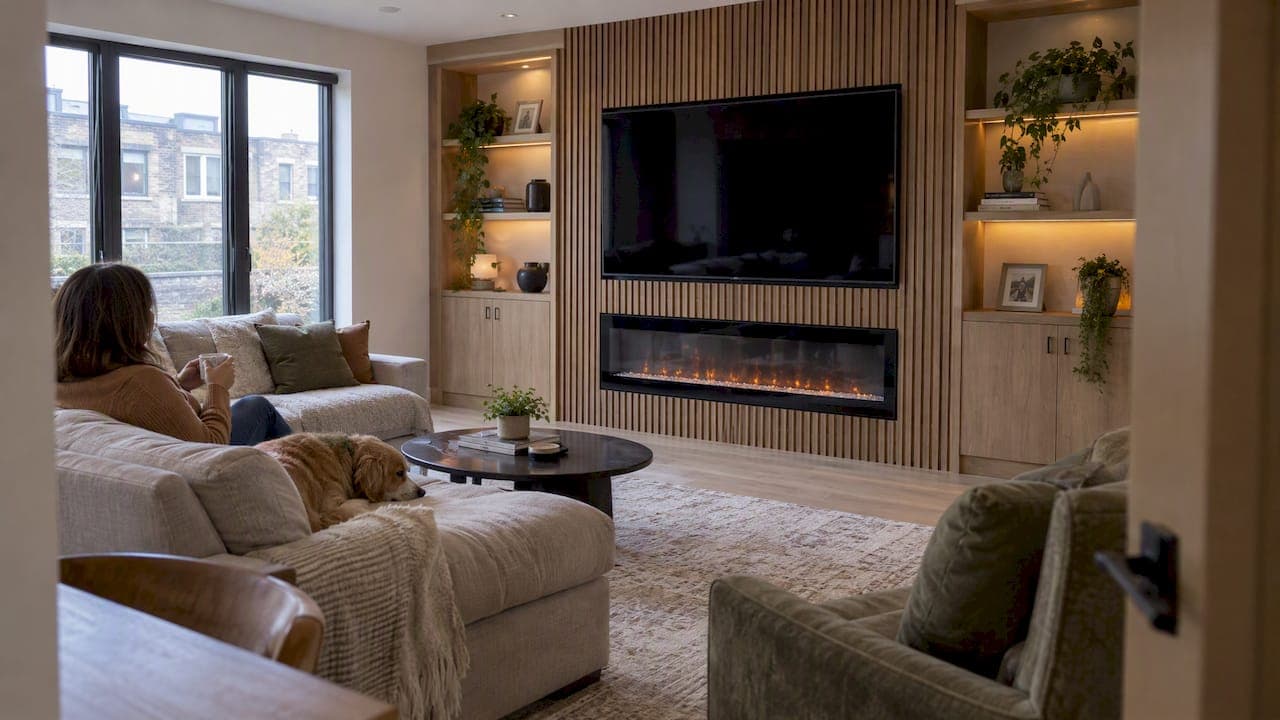
A good before and after media wall photo shows one thing: a blank wall with a TV and a tangle of cables becomes a deliberate focal point. The change comes from planning the whole wall (panels, lighting, hidden wiring, storage) instead of hanging a screen and hoping. Below, we walk through what real transformations look like at different budgets, what separates a polished result from a messy one, and how to plan a build you can finish in a weekend.
TL;DR
- The biggest before and after gains come from hiding cables, adding texture (slats, fluting, paint) and giving the TV a frame, not from buying a bigger screen.
- Budgets vary widely: one published makeover cost $160, another $1,500.
- Anchor or wall-mount every TV. The CPSC says this prevents tip-over accidents, which hit young children hardest.
- Plan for the next TV upgrade and for airflow around your components before you cut or glue anything.
- A pre-cut, pre-labeled kit removes most of the framing and measuring that make DIY builds drag on.
Table of Contents
- What a media wall change actually looks like
- Three real budgets, three different results
- What separates a great after photo from a mediocre one
- Safety comes before style
- A weekend plan for your own transformation
- Small details that show up in the after photo
- Our perspective: why we build kits instead of one-off walls
- Get your own before and after
- FAQ
- Sources
What a media wall change actually looks like
The "before" is usually familiar: a TV centered on a plain painted wall, a console underneath, a soundbar on top of it, and cables hanging down like vines. Nothing is wrong with it, but the wall has no point of view.
The "after" has four things in common, whatever the budget:
- A defined surface behind the TV. Paint, slat panels, fluted wood or a full-width panel build gives the screen a frame.
- Hidden infrastructure. Power, HDMI and speaker wire disappear behind the wall or into a cabinet.
- Light that supports the screen. Soft LED light behind or under a floating cabinet reduces the harsh contrast of a bright screen in a dark wall.
- Balanced storage. A few floating shelves or a low cabinet replace a crowded stand.
That is also the direction designers say homes are heading. The Houzz 2026 predictions point to zoned built-ins that combine shelving, media and storage into one cohesive look, with fewer separate furniture pieces.
Three real budgets, three different results
The $160 refresh: paint and cord control
Apartment Therapy featured a living room TV wall that went from a sad beige to a green statement wall for $160. No carpentry, no new electronics. It proves that color and tidy cables alone read as a major upgrade in a photo.

The limit is also clear. Paint changes the mood but adds no storage, no lighting and no architectural depth. If you want those, the wall needs more than a roller.
The $1,500 textured wall
In another feature, a once-plain wall behind a TV became a dramatic navy wall with fluted paneling, at a total project cost of about $1,500. The texture does the heavy lifting: shadows fall across the grooves, and a dark color makes the TV recede.
This is the sweet spot for many homeowners. You get a custom-looking wall without moving a stud, and the materials are cut and installed in a weekend or two if you are organized.
The full build-out
At the top end is the floor-to-ceiling build: a recessed or floating TV, a linear fireplace, illuminated shelves, cabinetry and acoustic or slat panels. Done by a contractor from scratch, this is a multi-week project with framing, electrical, drywall finishing and paint, and the price reflects it. If your wall is part of a larger renovation, it helps to see how a residential remodel project example is scoped, because framing, electrical and finishing are the line items that drive custom costs.
This is where pre-engineered kits earn their place. They aim at the full-build look while skipping the stud work and drywall finishing.
What separates a great after photo from a mediocre one
Treat the TV as part of the design, not an afterthought
Interior designer Margaret Donaldson, quoted by Apartment Therapy, says a common mistake is treating the TV as an afterthought. Designing the wall early, with viewing height, wire management and component ventilation in mind, turns the screen from a black rectangle into a seamless part of the room.
In practice, decide these before you buy anything:
- Viewing height. The center of the screen should sit roughly at seated eye level, which is lower than most people hang it above a fireplace.
- Component list. Soundbar, streaming box, game console, router. Each needs power, a signal path and air.
- Access. You will swap a cable eventually. Leave a way in.
Plan for the next TV
Screens keep getting bigger. The Ten Feet interior design guide advises planning around the whole entertainment setup, including future upgrades, rather than only today's screen. Many people regret a fixed, tight-fitting enclosure that has to be torn out when the TV is replaced.
The fix is simple: leave several inches of margin on each side of your current screen, use a mount that can be swapped or adjusted, and avoid building a niche that fits the TV to the inch.
Skip the overloaded shelving
The 2026 direction, according to the same Houzz roundup, moves away from crowded open shelving toward architectural integration: natural, textured materials such as warm oak, fluted wood and stone, with symmetrical layouts and non-distracting lighting. A few well-spaced floating shelves with one or two objects beat a wall of clutter. Our own media wall trends guide goes deeper on what is current.
Safety comes before style
Every media wall holds a heavy, top-heavy object. Before any panel goes up, settle how the TV is secured.
The U.S. Consumer Product Safety Commission says all flat-screen TVs should be wall-mounted or anchored to their furniture to prevent tip-overs. Its Anchor It! statistics show that between 2000 and 2018, 459 children aged 17 and younger died in tip-over incidents, and 93% of those involved children five and under. The agency's AnchorIt.gov page explains how to anchor furniture and TVs.
What that means for your build:
- Mount the TV into studs or into solid blocking, using hardware rated for its weight. Follow the mount manufacturer's instructions.
- If a TV sits on a cabinet, anchor both the cabinet and the TV.
- Keep cords out of a child's reach. If you have toddlers at home, we cover this in more detail in our kid-safe TV wall guide.
- If you are unsure about wiring inside the wall, bring in a licensed electrician. Local codes govern in-wall power, and inspections are often required before drywall closes; for an example of what a county expects, see this Weld County wiring handout. Your own city or county rules may differ.
A weekend plan for your own transformation
Here is how a kit-based build usually runs. Exact timing depends on the wall size, your tools and whether you add a fireplace or in-wall wiring.
- Measure and photograph the "before." Wall width, ceiling height, outlet and stud locations. The photo also helps when you compare later.
- Choose the layout. Centered symmetrical wall, off-center with a fireplace, or a floating panel. Our Essential Modern wall shows a minimalist version.
- Pick finishes and lighting. Decide on wood tone or paint color first, then metal hardware and LED strips to match.
- Prep the wall. Clear the area, locate studs, plan where power and cables will run.
- Install the panels in order. Pre-cut, pre-labeled pieces mean you follow numbers instead of cutting and guessing.
- Mount the TV and add components. Run cables, seat the soundbar, leave airflow space.
- Style last. Art, plants and a few shelf objects. Our guides on making art around a TV look intentional and decor ideas for a TV wall help here.
If you are on a small budget, start with the under $200 weekend fixes and add panels later. For color, see our accent wall paint ideas.
Small details that show up in the after photo
Lighting
LED lighting is the cheapest way to make a wall look expensive. A floating shelf with built-in light, such as the Oslo Lux LED, gives a soft wash on the wall. Choose a warm-to-neutral color temperature and dimmable output so the glow does not compete with the screen. Browse more options under media wall lighting.
Texture and sound
Slat panels add shadow lines and also soften echo in a room with hard floors. An acoustic slat panel in red walnut is one way to bring warmth to a flat wall. Houzz-related trend coverage notes that wooden slat walls remain a top-trending wall treatment, per the Furniture World report.
Hardware finishes
Brass, chrome and matte black each change the feel. Pick one metal and repeat it across shelf brackets, handles and any lamp near the wall. See the hardware finishes for options.
Heat and storage
A cabinet that traps heat shortens the life of your electronics. Leave vents, do not seal consoles behind solid doors without airflow, and read our notes on media wall storage that does not trap heat.
A fireplace
An electric linear fireplace is often what makes the after photo feel complete. Keep the TV height in mind: a screen mounted too high above a fireplace is the classic neck-strain mistake. Our electric fireplaces for media walls page lists what we carry, and the 70-inch distressed white electric fireplace TV stand is one all-in-one option.
Our perspective: why we build kits instead of one-off walls
We started from a simple observation: most people who want a media wall do not want a construction project. They want the finished photo. Custom builds are slow and expensive because every cut, joint and wire path is invented on site. A kit moves that thinking into the factory.

So our panels arrive pre-cut and pre-labeled, designed to go up in a weekend, with integrated LED lighting, floating cabinetry, slat accents and hidden wire management as part of the system. We have helped more than 1,000 customers do this, and the feedback that matters most is not about the look. It is that people finished the job themselves.
Our honest advice: do not start with the product. Start with the room, the TV you may own in three years, and the cables you want gone. Then choose a layout. If you would rather have someone else do the labor, we also offer white-glove installation in the San Francisco Bay Area.
— Jake
Get your own before and after
If you want a plan before you commit, our design services start with a Single Concept Design at $99, a 3 Concepts + Revision Design Package at $199, or a Full Design & Quote at $299. Each is a one-off fee. You can also browse our DIY media wall kits on the shop page, see the steps on How It Works, or look at white-glove installation if you live in the Bay Area. Kits ship nationwide, and returns are risk-free.
FAQ
How long does a media wall transformation take?
A paint-and-cable refresh can take an afternoon. A kit-based build is designed for a weekend. A from-scratch custom build with framing, electrical and drywall finishing takes much longer, because those trades happen in sequence and each needs to dry or be inspected.
Can I do a media wall if I rent?
Paint and freestanding furniture changes are the realistic options in a rental, and only with your landlord's permission. Kits and mounted panels are meant for homeowners who can attach them to the wall structure.
How much does a media wall cost?
It depends on how far you go. Published makeovers range from $160 for paint and cord management to about $1,500 for a fluted wood wall. Kit pricing depends on size and options, so check the shop for current numbers.
Do I need an electrician?
If you only plug into existing outlets and hide cables behind panels, probably not. If you add a new outlet, run power inside the wall or hardwire a fireplace, hire a licensed electrician and check your local permit rules.
Sources
- Before and After: I Transformed My Sad Beige Living Room TV Wall with a Budget of $160, Apartment Therapy
- Before and After: This Dramatic $1,500 TV Wall Transformation, Apartment Therapy
- TV wall ideas, Apartment Therapy
- Houzz 2026 U.S. Home Design Trend Predictions, Furniture World
- TV Feature Wall Planning Beyond TV Size, Ten Feet
- CPSC urges fans to anchor TVs and furniture
- Anchor It! statistics, PR Newswire
- AnchorIt.gov, CPSC
- Basic Requirements for Wiring a Single Family Dwelling, Weld County