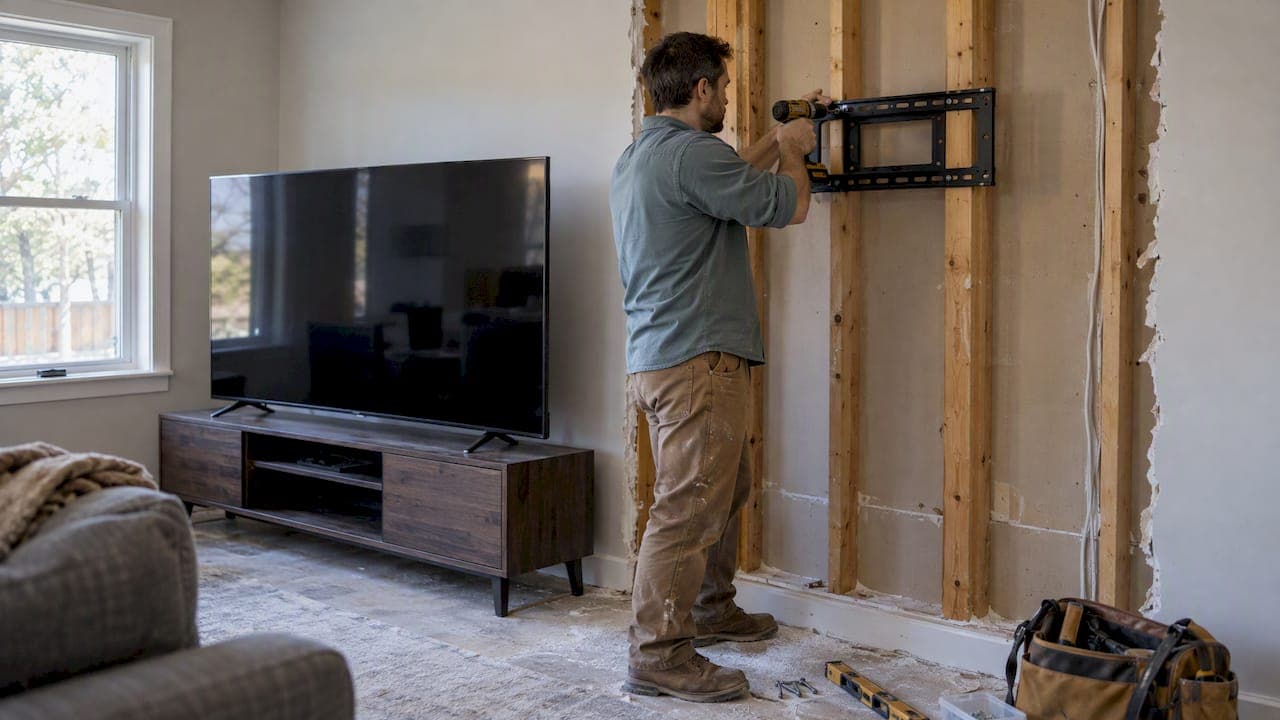
Before you buy the bigger screen, measure your wall opening and your main seating distance, confirm that studs or backer boards sit where the mount needs them, and decide where power and cables will run. Those three checks decide which sizes will actually work. If you want a lower-risk path, a pre-engineered media wall kit or a design package settles most of those questions for you.
TL;DR:
- With a TV 75 inches or larger, viewers sitting too close may need to move the sofa back a foot or two.
- For TVs 75 inches or larger, secure mounts to studs or backer board; full motion arms add leverage, and hire a pro for masonry walls.
- Aim for seated eye level, often about 42 inches to screen center; above a fireplace, mount lower when safe and use a tilting bracket.
- Surface raceways hide cables without cutting walls; in wall power relocation needs a UL rated kit and a licensed electrician where local rules require one.
- Follow the clearance requirements in the TV manual, ventilate enclosed equipment cabinets, and check the mantel’s heat before mounting above a working fireplace.
Table of Contents
- What should you measure before choosing a bigger TV?
- How do you check structural readiness and pick the right mount?
- How do you adapt a built-in or niche to fit a bigger TV?
- What are the safest ways to hide cables and power a wall-mounted TV?
- How do you make a larger TV look intentional in the room?
- Where should a larger TV sit for comfortable viewing?
- Should you DIY the upgrade or hire a pro?
- How will a bigger TV change furniture and seating?
- Does a bigger TV change heat and ventilation needs?
- What audio and video gear should you upgrade with a bigger TV?
- Which media wall kits work with bigger TVs, and how can you customize them?
- Why we design the wall before the screen
- How can we make your bigger TV upgrade easier?
- FAQ
- Sources
What should you measure before choosing a bigger TV?
Grab a tape measure and a notepad. Measuring now can save a return trip to the store later. Record these numbers:
- Wall width and height, floor to ceiling and corner to corner.
- Usable opening width, subtracting trim, shelves, speakers and any cabinet sides that crowd the screen.
- Primary viewing distance, measured from the couch cushion to the wall, plus the distance from any secondary seats.
- Seated eye height, from the floor to your eyes while you sit the way you normally watch.
- Stud locations, marked with painter's tape, along with outlet positions and any nearby heat sources like a fireplace or vent.
- Obstructions, such as windows, doorways, sconces or a ceiling beam that limit where the screen can go.
Then turn the numbers into a one-line spec sheet: maximum TV width, preferred center height, and the mount area you actually have. A general rule for choosing a size is to sit roughly twice the screen diagonal away for HD content, a thumb rule that stand guides use. Higher-resolution screens let you sit closer. Our guide to picking the right TV size for your room walks through the math, and it helps to know that TVs are trending larger, so many buyers end up with a screen bigger than the one they first pictured.
Keep the spec sheet on your phone while you shop. When a salesperson quotes dimensions, you can check them against your opening in seconds instead of guessing.
How do you check structural readiness and pick the right mount?
Drywall alone cannot carry a large screen. For displays at 75 inches and up, the mount has to fasten to studs or a backer board, and full-motion arms add leverage that puts extra stress on the framing. A TV that feels light in your hands puts more leverage on the mount when it is pulled away from the wall.
Start by finding studs with a stud finder, then compare the stud spacing to the hole pattern (the VESA pattern) printed in your TV's manual or on the mount's spec sheet. Standard framing puts studs 16 inches apart, but your wall may differ, and a bracket that spans two studs is far safer than one that catches only one. If your studs don't line up with the bracket, add blocking.
Choose the mount by how you watch:
- Fixed sits flattest and puts the least strain on the wall. It suits a TV at a comfortable height.
- Tilting angles the screen down, which helps when it hangs above a console or fireplace.
- Full-motion swings out and turns, which helps in open rooms but multiplies stress on the fasteners.
To add blocking inside an open or opened wall:
- Mark the mount's height and width on the wall, then add a few inches of margin on every side.
- Cut a horizontal board to span at least two studs.
- Fasten it flush between the studs with structural screws or nails driven through the stud faces.
- Confirm it is level and solid by pressing hard on it before you cover it up.
- Close the wall with drywall or panels, and mark the blocking position on the surface so you can find it later.
Pro Tip: Photograph the blocking before you cover it and tape a note inside a nearby cabinet with its measurements. Future you will thank you.
Plaster, brick and concrete need special anchors and drill bits, and a poor anchor in those surfaces can let a heavy screen come down. We suggest hiring a pro for those walls. If you're mounting on drywall, our guide on mounting a TV on drywall covers stud-first methods and studless options.
How do you adapt a built-in or niche to fit a bigger TV?
If the screen is only a few inches too wide for your recess, you have more options than you think. Here are the methods we see work best:
- Frame out the niche. Remove the trim, then add new framing on one or both sides to widen the opening. Fur out the back if you need extra depth for a mount.
- Reconfigure the trim. Take it off carefully, widen the opening, and reinstall it with new cuts, or replace it with a slightly wider profile.
- Go surface-mount. Skip the recess entirely and add a slat or panel feature wall that lets the screen hang proud of the surface. Picture-frame molding or floating cabinetry can visually widen the space.
- Swap the cabinetry. A console that is a few inches wider than the screen keeps the setup balanced, so match materials and finish to the room. A wall cabinet in a matching finish can also flank the screen and add storage.
- Mock it up first. Tape the new screen's outline on the wall or cut a cardboard rectangle to scale, then live with it for a day or two. You'll spot clearance problems before you pick up a saw.
For common TV sizes and the kit dimensions that fit them, see our media wall dimensions guide.
What are the safest ways to hide cables and power a wall-mounted TV?
Visible cords ruin a clean wall, but hiding them wrongly can create a hazard. Your two main choices are an in-wall power relocation kit and a surface raceway. In-wall kits give the cleanest look, but they involve electrical work, so choose UL-rated products and hire a licensed electrician where local rules require one. Surface raceways stick to the wall, paint to match, and need no cutting.
A few habits make any cable plan better:
- Run extra conduit. While the wall is open, pull a spare HDMI cable, an Ethernet line and a power path. Adding them later is far harder.
- Vent your gear. Put the soundbar, streaming box and console in ventilated cabinetry or a nearby media closet, not behind a sealed panel.
- Plan the remote. Infrared remotes need line of sight, so use networked devices or an IR repeater if components are hidden.
- Label every run. Mark both ends of each cable so future upgrades don't turn into a guessing game.
Pro Tip: Leave a pull string or a stiff fish tape inside any conduit you install. It can make a future cable swap easier and help avoid a wall repair.
How do you make a larger TV look intentional in the room?
Designers advise treating the screen as a holistic architectural feature, with lighting, cabinetry and any fireplace working together so the TV reads as designed rather than dropped in. That also means planning the TV early, so size, wiring and ventilation are settled before finishes go on. A few concrete moves help:
- Run a continuous feature wall. Wood slats, veneer panels or a painted accent wall unify the screen with its backdrop. Our acoustic slat panels are one way to get that look, and they double as sound control.
- Frame it with storage. Balanced cabinetry, floating shelves or picture-frame molding anchor the screen's scale and give you somewhere to put the clutter.
- Add LED or bias lighting. A soft glow behind or around the screen reduces the perceived mass and eases eye strain during dark scenes. Browse our media wall lighting options.
- Plan for the screen being off. Most of the day the TV is a black rectangle. Minimal frames, art-mode screens or a matching surround help it blend in.
For a few more ideas on backdrop treatments, see our note on acoustic backdrops behind a TV.
Where should a larger TV sit for comfortable viewing?
Aim for the center of the screen near your seated eye level, which in many living rooms lands around 42 inches off the floor. Matching the center to eye height also helps avoid neck strain and glare. If the TV must go above a console or fireplace, drop the height as far as is safe and use a tilting mount to angle the picture down toward your seats. For above-fire installs, a special fireplace mount and a check on heat are essential, and our fireplace media wall guide explains the details. Because higher-resolution screens look sharp from nearer, you can often sit a bit closer than the old rule suggests. Before you buy, tape a full-size rectangle to the wall and sit on your couch. If your eyes are always looking up, the placement is wrong.
Should you DIY the upgrade or hire a pro?
DIY-friendly jobs include finding studs, adding blocking in an open wall, mounting a fixed or tilting bracket, installing surface raceways and building a slat feature wall. Bring in a pro for electrical work, masonry or concrete, and any structural framing change.
- Timelines: a simple swap and remount may be quicker than widening a built-in.
- Cost drivers: electrical work, framing and blocking, finish materials and labor.
- Questions for an installer: Have you hung screens this size? How will you secure the mount to the framing? Who handles the power and what code applies?
How will a bigger TV change furniture and seating?
A larger screen changes how the whole room works. Start with distance: a 75-inch or bigger display sitting too close to the sofa makes viewers scan the picture instead of watching it, so you may need to pull the seating back a foot or two. If the room is small, you may choose a slightly smaller diagonal rather than push the couch against the back wall.
Think about angles too. Seats at the far sides of a sectional see a dimmer, less accurate picture than seats in the center, so check your alternate seating on the spec sheet you made earlier. A wider screen also makes a narrow console look undersized, which is a good reason to widen the cabinet, as we described for built-ins.
Walkways matter. Don't let new speakers, a floor lamp or a larger console block the path to the room. Keep at least a few feet of clear space between the front of the cabinet and the nearest seat, and leave room for doors to swing.
Finally, test comfort before you commit. Sit in every seat while a friend holds the cardboard mockup at the planned height. Check for neck tilt, glare from windows and reflections from lamps. A short test now beats living with a poorly placed screen for years, and a quick rearrangement of the furniture is far easier than moving a mount.

Does a bigger TV change heat and ventilation needs?
Bigger screens draw more power and give off more heat, and a niche that was fine for a 55-inch set can trap warmth behind a 100-inch one. Designers recommend considering ventilation early in the design process, alongside size and wiring, which is the right habit here too.
Leave breathing room around the TV. Don't pack the sides and back of a recess tight with panels or foam. Check the manual for the manufacturer's recommended clearance, and follow it. Our guide to acoustic backdrops discusses support and clearance so panels don't smother the set.
Mind the neighbors. Components stacked in a closed cabinet run hotter than the TV itself, so give them vents, a small quiet fan or an open back panel. Keep screens away from heat sources like a fireplace firebox, a floor vent that blows warm air upward, or a south-facing window that bakes the wall in the afternoon. If you're mounting over a working fireplace, measure how warm the mantel gets first and talk to a professional about whether the spot is safe.
A bigger screen rarely changes your home's HVAC needs in any dramatic way, but it can make a small, closed room feel warmer during long movie sessions. A little airflow goes a long way.

What audio and video gear should you upgrade with a bigger TV?
A large screen exposes the weak links in your setup. Thin built-in speakers that sounded fine on a small set feel lost against a picture that fills the wall, so a soundbar or a proper speaker system is usually the first upgrade. Plan a spot for it during the wiring stage so cables don't dangle.
Check your cables and sources too. Older HDMI cables may not carry the newest high-resolution formats, so label and replace any that came from a drawer of mystery cords. Make sure your streaming box, console or receiver can output the resolution and frame rate your new screen supports, or you won't see the difference you paid for.
Mind the mount's reach. If the set will hang flat to the wall, a slim soundbar below it needs clearance so it doesn't block the screen's lower edge. For ultra-large models, such as the 115-inch model LG announced for 2026, plan the whole room around the screen, including lighting and seating, instead of treating the TV as the last item on the list.
Finally, consider smart controls. A hub that turns on lights, dims the room and starts the TV in one tap makes a big screen feel finished. Our smart tech accessories can help with that.
Which media wall kits work with bigger TVs, and how can you customize them?
A pre-engineered kit takes much of the guesswork out of a bigger-TV upgrade. Our media wall kits come with pre-cut, pre-labeled panels, integrated LED lighting, floating cabinetry, slat accent panels and hidden wire management in a modular system. You choose the finish, add what you need, and assemble it over a weekend.
Sizing is the part most buyers ask about. Match your spec sheet to the kit's width and height, and compare them with the common size groupings in our media wall dimensions guide. If you plan to hang a very large screen, confirm the mount area has solid backing before you build.
Customizing is where kits shine. You can add an electric fireplace, choose hardware in brass, chrome or matte black, add lighting, shelving or cabinetry, and pick the finish that suits the room. If a built-in piece is what you're after, the 70-inch distressed white electric fireplace TV stand is a ready-made option. Browse the full range on our media wall kits page.
Why we design the wall before the screen
We think the TV wall should be designed as one feature, not patched together after the screen arrives. The most common retrofit mistakes are all avoidable with simple pre-checks: forgotten blocking, a power outlet in the wrong place, and a screen bought before anyone taped out its size. Mock it up, mark the studs and plan the wiring first, and the rest gets easier. Our experience with pre-engineered kits and weekend installs shows how much smoother a project goes when the design leads.
— Jake
How can we make your bigger TV upgrade easier?
If you'd like a lower-risk route to the finished look, our media wall kits and design packages give you matched finishes, hidden wire management and clear instructions. Our Single Concept Design is $99, the 3 Concepts + Revision Design Package is $199, and the Full Design & Quote is $299, all available on our shop page. If you'd rather skip the build, our White-Glove Installation handles it for you, and our accessories, from lighting to cabinetry, complete the wall.
Start by measuring your wall and seating distance, read how it all comes together on our how-it-works page, then pick the design package that suits you and request your quote.
FAQ
How do you modernize a TV wall?
Start by simplifying the wall: hide cables, add a continuous feature wall such as wood slats or paneling, and frame the screen with balanced cabinetry. Add LED or bias lighting to make the TV feel built in rather than hung on the wall.
What is the largest wall TV you can buy?
Ultra-large screens keep growing. LG's 2026 lineup is headlined by a 115-inch model, and larger sizes exist from other makers. Check the weight and wall structure before you commit.
Can you put a 100-inch TV on the wall?
Yes, if the wall can carry it. Use a mount rated for the TV's weight and fasten it to studs or a backer board, since drywall alone is not enough for extra-large displays. Hire a pro if your wall is plaster, brick or concrete.
Can drywall hold a 50-inch TV?
Drywall by itself is not a safe anchor for a TV. Fasten the mount into studs, or add a horizontal backer board so the load sits on solid framing, and confirm the mount's weight rating against your TV.
Sources
- 34 TV Wall Ideas That Are Both Functional and Stylish
- How to wall-mount your TV
- Installing & Mounting Large TVs| Hisense
- 28 Gorgeous TV Wall Design Ideas Featured in Real Homes | Apartment Therapy