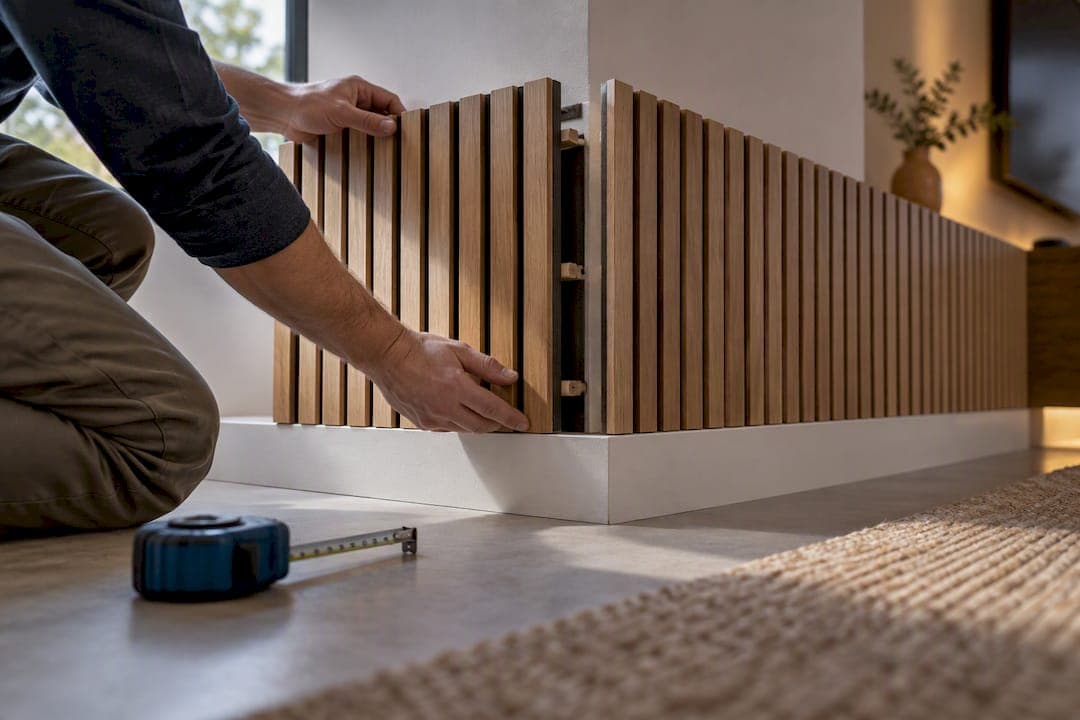
A corner media wall is a smart, space-saving way to make a TV feel intentional rather than awkward, and it works especially well in rooms where the main wall is already busy with windows or a fireplace. The one thing to nail down before anything else: pick a full-motion mount and plan your cable routing before you drill. Anchor everything to studs or concrete, never drywall alone.
TL;DR:
- Full-motion articulating mounts are essential for corner TV installations because they allow swiveling and positioning flexibility, especially to avoid glare.
- Mounts should be anchored into studs or concrete, with safety margins five times the TV and mount's combined weight, never into drywall alone.
- Corner measurements must account for wall height, usable depth, and outlet placement to prevent alignment issues and functional obstructions before installation.
- Cable management options include paintable raceways for renters or in-wall cable kits for permanent setups to hide wires effectively in corners.
- Cost varies from basic furniture consoles to custom alcove or built-in units, with the safety risk of tip-over requiring proper anchoring, especially in homes with children or pets.
Table of Contents
- What Are the Best Corner Media Wall Designs?
- How High Should a Corner TV Be Mounted?
- What Mount Do You Need for a Corner TV?
- How Do You Hide Cables in a Corner Media Wall?
- What Materials and Lighting Work Best in a Corner?
- How Do You Fit an Electric Fireplace Into a Corner Media Wall?
- How Do DIY Kits Solve Corner-Specific Problems?
- How Do You Measure a Corner for a Media Wall?
- What Problems Come Up During Corner Installs?
- What Does a Corner Media Wall Cost?
- What Safety Risks Are Unique to Corner Media Walls?
- Author Jake's Quick Take: DIY vs Hire for Corner Media Walls
- Get a Kit or a Custom Quote for Your Corner
- Sources
- FAQ
What Are the Best Corner Media Wall Designs?
The right design depends less on style preference and more on your room's shape and how much storage you actually need. Some corners want to disappear into the wall; others want to become the room's main event.
- L-shaped wraparound units work best in open-plan rooms that need real storage. They wrap both walls of the corner, giving you cabinetry on one side and a media shelf on the other, which is why they show up so often in media wall design ideas built for family rooms.
- Floating corner units suit small rooms and a more modern, minimal look. Mounting everything off the floor keeps sightlines open, which matters a lot in a tight apartment corner.
- Angled or triangular consoles are furniture, not construction. If you rent or just don't want to commit to anything permanent, this is the easiest entry point into a corner tv setup.
- Built-in alcove units get custom-fitted to whatever quirks your architecture throws at you, including an integrated fireplace. These take more planning but solve problems a stock unit can't.
- Bedroom and multi-zone corners usually skip the heavy storage in favor of a slimmer floating shelf and a lower-profile mount, since the goal there is a clean wall, not a media hub.
Designers increasingly treat corner TV placement as a proactive design choice rather than a compromise, especially in rooms where the main wall is already claimed by a fireplace or a bank of windows.
How High Should a Corner TV Be Mounted?
Standard advice puts the center of the screen around 42 inches from the floor for seated viewing. Corner installations often push that higher, into the 48 to 54 inch range, because the viewing angle changes when the screen sits diagonally instead of flat against a wall.
Here's the quick way to test it before you commit to a single hole:
- Cut a paper template the size of your TV and tape it to the corner at your planned height.
- Sit in every seat you'd normally watch from and check eye level against the template's center.
- Adjust up or down in small increments. A couple of inches makes a bigger difference in a corner than on a flat wall.
- Recheck viewing distance. Screens angled into a corner often sit a bit closer to seating, so err toward the higher end of the range to avoid a steep downward tilt.
Quick reference: 42 inches is the flat-wall standard; corner setups commonly land between 48 and 54 inches depending on seating geometry, according to mounting height guidance from TopUpTV. Our own guide to TV mounting height walks through how to adjust that number for your specific ceiling height and couch distance.
What Mount Do You Need for a Corner TV?
Full-motion articulating mounts are the only real option for a corner tv wall design. A fixed mount locks your screen at one angle, which in a corner usually means half the room can't see it properly. An articulating arm lets you swivel and pull the screen out to face whichever seating cluster is using the room, and designers specifically recommend this style for corner installs because it adapts to daylight glare and shifting seating arrangements.
The structural rule matters more than the mount style, though. Manufacturer installation guidance is explicit: never mount into drywall alone. Mount only into wood studs, solid concrete, or concrete block, and the wall itself needs to support five times the combined weight of the TV and mount.
Run through this checklist before you drill a single hole:
- Locate studs with a stud finder and mark both edges of each one.
- Verify stud centers match your mount's bolt pattern. Corner framing sometimes runs at odd spacing, so don't assume standard 16 inch centers.
- Drill pilot holes before driving lag bolts. This prevents splitting and keeps bolts running true.
- Torque hardware to the mount manufacturer's spec, not just "tight."
- If studs are irregular, missing, or you're dealing with a recessed fireplace cavity, hire a professional installer instead of improvising.
Pro Tip: Before you drill anything, extend the mount's arm to its full reach and swing it through its full range of motion. Corner mounts need at least 2 to 4 inches of clearance from the adjacent wall to swivel freely, and you won't catch that problem until the arm is already loaded with a TV.
Our stud finder recommendations and mount selection guide cover the tool-specific details if you're shopping for hardware.
How Do You Hide Cables in a Corner Media Wall?
Corners are unforgiving about visible wires. A single loose cable running diagonally across a corner reads as clutter in a way it never would on a flat wall.
- Renters: paintable corner raceways and surface-mounted channels let you route cables along the seam without touching drywall. Paint them to match and they disappear.
- Permanent installs: angled in-wall cable kits, paired with a relocated outlet behind the TV, give you a completely clean corner with no visible hardware at all.
- Plan before you mount: measure cable length and decide where source devices (streaming box, console, soundbar) will sit before the TV goes up. Reworking cable routing after installation usually means pulling the mount back off the wall.
What Materials and Lighting Work Best in a Corner?
Material choice changes how "finished" a corner feels. MDF takes paint beautifully and is the go-to for a clean, matte look. Plywood shows real wood grain if you want warmth without a full custom build. Veneers and laminates get you a similar visual result at a lower cost, which matters if you're outfitting a large L-shaped unit.
The biggest design trap in a corner tv feature wall is the "boxed-in" look, where dark cabinetry on two walls makes the space feel smaller instead of more finished. Light colors, slat accent panels, or one textured feature panel break that up without sacrificing storage.
Lighting does more work here than most people expect. Bias lighting set 2 to 4 inches behind the screen cuts eye strain and makes the TV look like part of the wall rather than a box stuck onto it. Add one flanking lamp to soften the corner seam, and recessed shelf LEDs to add depth to any open shelving.
Pro Tip: Match your bias lighting's color temperature to how you use the room. Warm 2700 to 3000K light feels cozier for movie nights, while 6500K keeps colors accurate if you're doing any color-sensitive work on that screen.

How Do You Fit an Electric Fireplace Into a Corner Media Wall?
Clearance is the whole game here. Always check the fireplace manufacturer's specific clearance requirement rather than assuming a universal number. Typical guidance suggests roughly 12 to 18 inches between the top of the fireplace and the bottom of the TV, but that figure moves depending on the unit's heat output and enclosure design.
- Recessed fireplace units often need a dedicated fresh-air inlet or airflow path. Sealing that cavity closed to hide wiring can damage the unit or the electronics above it.
- If you're unsure whether your planned clearance is adequate, offset the TV to one side or switch to a floating shelf solution instead of stacking the screen directly overhead.
- Confirm your specific model's requirements before framing anything permanent. Our fireplace accessories page covers unit options built for media wall integration.
How Do DIY Kits Solve Corner-Specific Problems?
Corners punish measurement errors in a way flat walls don't. A quarter-inch mistake on a flat wall is forgiving; the same mistake at a 90 degree corner joint compounds across two panels. Pre-cut, pre-labeled kits remove most of that risk because every panel is already sized and marked before it reaches your living room.
Some DIY media wall kits build in hidden wire management and integrated LED options, which solves the two hardest parts of a corner install: routing cable around an angled joint and placing bias lighting without running new wire runs mid-project. Kits with labeled panels and hidden channels materially cut install time and reduce the chance of a measurement mistake in awkward corner geometry.
A kit makes sense if you want a faster, budget-conscious install and can follow a labeled sequence. A fully custom build, or the Bay Area's local white-glove installation option, makes more sense if your corner involves a recessed fireplace, relocated outlets, or framing that doesn't match a standard template.
How Do You Measure a Corner for a Media Wall?
Corner measurements go wrong in predictable ways, and almost all of them come down to skipping one of three checks.

Start with wall height on both sides of the corner, not just one. Corners in older homes frequently sit slightly out of square, so a measurement taken on the left wall can be off by half an inch or more by the time you reach the right wall. Measure both walls independently rather than assuming symmetry.
Next, measure the actual usable depth of the corner, meaning the distance from the corner seam out to where you want the unit's front edge to sit. This determines whether an L-shaped wraparound will fit without crowding a doorway or walkway. Leave at least 36 inches of walking clearance in front of any unit if the corner sits along a main traffic path.
Then check diagonal depth for anything with a triangular or angled front, since a corner console's usable depth is measured from the wall seam to its front point, not from either flat wall. This number decides how far the TV will sit into the room, which affects both your walking clearance and your seated viewing distance.
Finally, measure outlet and switch locations relative to your planned mount height. An outlet that lands mid-panel on a floating unit forces either a cutout or a relocation, and it's far easier to catch that on paper than after cabinetry is already up. If your corner includes any built-in cabinetry with a pet-friendly dual purpose in mind, multipurpose furniture pieces are worth a look for smaller rooms doing double duty.
Write every measurement down before you shop for a kit or console. A corner that's an inch narrower than you remember will derail an otherwise perfect plan.
What Problems Come Up During Corner Installs?
The most common complaint after a corner install isn't the design. It's realizing the mount can't swing far enough to face the main seating area. This almost always traces back to skipping the swivel test before drilling, so simulate full extension and rotation with the TV held in place (or a cardboard stand-in) before committing to hole placement.
Uneven stud spacing is the second recurring headache. Corner framing sometimes runs differently than the rest of the wall, with studs bunched closer together near the joint or, less commonly, spaced wider than a standard 16 inch run. A stud finder will catch this, but only if you check both walls of the corner rather than assuming the pattern continues from the flat wall next door.
Glare is a subtler problem that shows up days after installation, not during it. A corner that looked perfectly lit during a daytime walkthrough can turn into a glare-filled screen once afternoon sun hits a window at a different angle. If glare becomes an issue after the fact, a full-motion mount is the fix, since it lets you angle the screen away from the light source without remounting anything.
Cable slack is the last common miss. Source devices placed too far from the TV during planning often leave you short on cable length once the unit is against the wall, or with too much slack bunching visibly in a raceway. Measure device placement and cable runs before finalizing your cabinet layout, not after.
What Does a Corner Media Wall Cost?
Cost scales almost entirely with how permanent and custom the build is, not with square footage.
A furniture-first triangular console sits at the low end. You're buying a piece of furniture and a mount, nothing more, which makes it the easiest entry point for renters or anyone testing whether a corner tv setup even works for their room before committing further.
A floating corner unit with a full-motion mount and basic cable management sits in the middle. Costs climb here because you're adding wall-mounted hardware, possibly an in-wall cable kit, and sometimes floating shelving with integrated lighting.
An L-shaped wraparound or built-in alcove unit sits at the high end, especially once you add an electric fireplace or custom framing around architectural quirks. This is where a pre-cut kit earns its keep. Because panels arrive sized and labeled, you're paying for materials and hardware rather than the extended labor hours a fully custom carpenter build requires. A local white-glove installation adds cost but removes essentially all of the measurement and mounting risk described above.
Whatever tier you're considering, price out the mount and lighting separately from the cabinetry. It's common to underbudget the accessories and get surprised at checkout.
What Safety Risks Are Unique to Corner Media Walls?
Tip-over risk goes up in a corner, not down, which surprises a lot of homeowners planning their first build. A media console positioned at an angle, especially a taller floating or L-shaped unit, has a different center of gravity than the same piece flat against a single wall. Any unit that isn't mounted or anchored needs to be secured to the wall with an anti-tip strap, particularly in homes with kids or pets who might climb or lean on it.
The TV mount itself carries the biggest structural risk. Reiterating the core rule here matters: never mount into drywall alone, and design the wall to support five times the combined weight of the TV and mount, per manufacturer installation guidance. That safety margin exists because a mount under constant load, especially a full-motion arm being extended and retracted repeatedly, puts more stress on anchor points than a static fixed mount does.
Heavy floating shelves near a corner TV need the same scrutiny. A shelf loaded with a soundbar, gaming console, or decor items is still a suspended weight above a seating area, and it needs the same stud-anchored mounting as the TV itself, not just adhesive strips or drywall anchors.
If an electric fireplace sits below the TV, treat heat clearance as a safety issue, not just a performance one. Insufficient clearance risks both fireplace damage and long-term stress on the electronics above it, which is the same caution that applies to any fireplace-and-TV combination regardless of wall shape.
Author Jake's Quick Take: DIY vs Hire for Corner Media Walls
Go DIY with a kit if you can follow a labeled template and your project doesn't touch in-wall electrical work. Most corner installs fall into that category, and a pre-cut kit removes the measurement guesswork that trips up first-timers.
Hire a professional the moment a recessed fireplace, relocated outlet, or unusual framing enters the picture. Ask yourself three questions right now: do you have a stud finder and a level, are you comfortable cutting or fitting panels yourself, and are you willing to move an outlet if the layout demands it? Two "no" answers means it's time to call someone.
— Jake
Get a Kit or a Custom Quote for Your Corner
Themediawallstore turns the hardest part of a corner build, precise measurement and clean wiring, into a labeled, pre-cut kit instead of a guessing game with a table saw. Every kit ships with sized panels, hidden wire channels, and LED lighting options built in, so the bias lighting and cable routing covered above come pre-solved rather than bolted on afterward.
If your corner is a standard shape, browse the Media Wall Kits to see finishes and layouts built for fast, contractor-free installation. If your space has a recessed fireplace, odd framing, or you just want eyes on your exact measurements before you commit, start with a Full Design & Quote for $299 one-off, or a 3 Concepts + Revision Design Package for $199 one-off if you want options to compare first. Every kit ships with expert support and risk-free returns, so the only real decision left is which finish fits your room.
Sources
Check your mount's own installation manual for exact weight ratings and anchoring requirements, since specs vary by model even within the same brand. Use a mounting height guide alongside a reliable stud finder before marking anything on the wall. If an electric fireplace is part of the plan, its manufacturer's clearance and airflow spec overrides any general rule of thumb you find online.
- VSF716_IM_250331.pdf — Sanus product installation manual
- Corner TV ideas — Livingetc
- TV mounting height guide — TopUpTV
- Corner TV ideas — The Decorholic
FAQ
Can You Have a Corner Media Wall?
Yes, and it's become one of the more popular layouts for rooms where the main wall is already taken up by windows or a fireplace. Designers increasingly treat corner TV placement as an intentional design choice rather than a fallback, particularly with full-motion mounts that adapt to different seating angles.
Are Media Walls Still Fashionable?
Media walls remain a strong design trend, especially versions that integrate a fireplace, floating shelving, and hidden lighting into one cohesive unit. The style has shifted from bulky entertainment centers toward slimmer, floating designs with slat panels and bias lighting that feel more like architecture than furniture.
How Do You Display a TV in a Corner?
Mount it with a full-motion articulating mount anchored into studs or concrete, set the screen center around 42 inches for standard viewing or up to 48 to 54 inches for typical corner geometry, and ground the setup with a floating shelf or console below. Bias lighting behind the screen and one flanking lamp finish the look without making the corner feel cramped.
Are Corner TV Stands a Good Option?
A corner TV stand or triangular console is one of the easiest ways to test a corner tv setup without any wall modification, and it works well for renters or anyone who wants flexibility. For a more finished, built-in look with hidden wiring and integrated lighting, a pre-cut kit from Themediawallstore delivers that result without a full custom carpentry job.