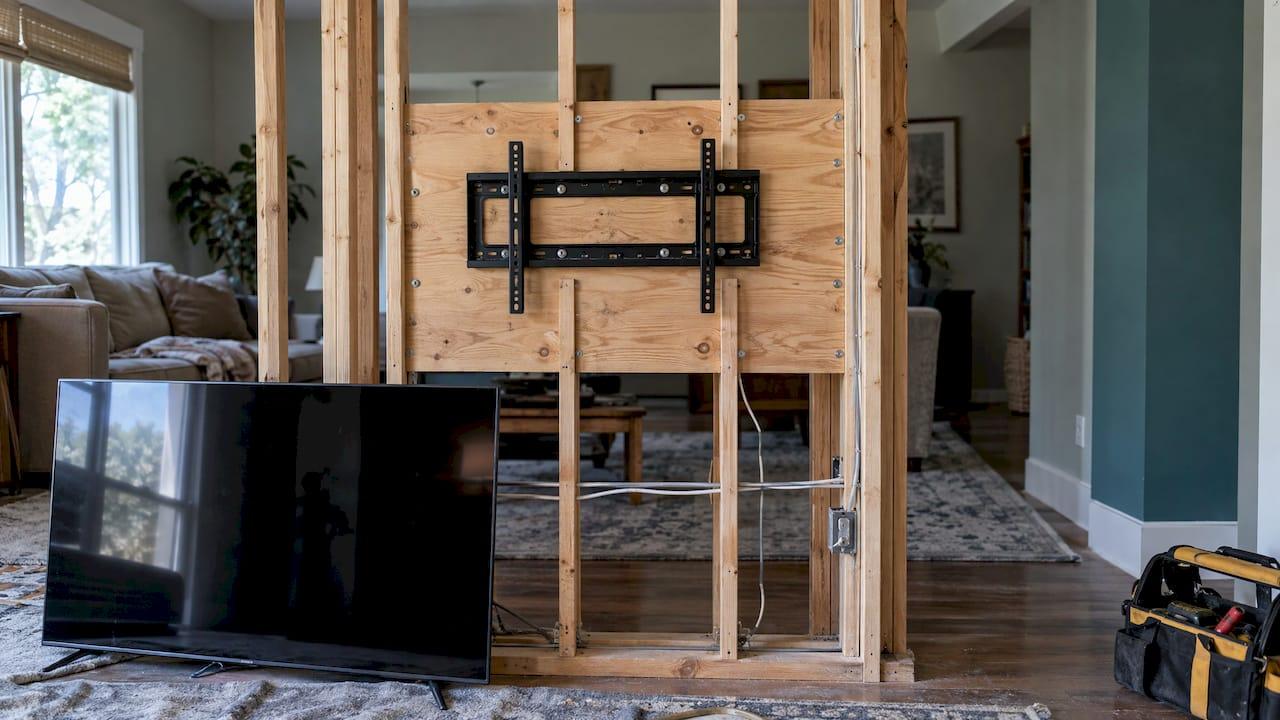
There is no single weight capacity for a media wall. What it can carry depends on what you fasten to: studs and solid backing hold hundreds of pounds, while drywall alone holds about 100 pounds in total at best. Plan every heavy item (TV, shelf, fireplace unit) so its fasteners land in framing, and size the wall to carry at least four to five times the combined weight of what you mount.
That is the practical answer. The rest of this guide shows how to apply it: what each part of the wall carries, how an extended TV arm multiplies the load, how to run the numbers for your own setup, and when to bring in help.
TL;DR
- A media wall is only as strong as its attachment points. Studs and plywood backing carry the load; drywall and anchors do not.
- Mount manufacturers ask for a wall that supports four to five times the combined weight of the TV and mount.
- A full-motion arm pulled out from the wall multiplies the force on the top fasteners, so a TV that is light on paper can still pull a mount loose.
- Shelves, a soundbar and a fireplace unit each need their own anchoring into studs or backing, not a share of the TV's.
- If you cannot confirm what is behind the wall, get the design checked before you build.
Table of Contents
- Why one number never fits every media wall
- What actually carries the weight
- How much does your TV really put on the wall?
- Why a full-motion arm changes the math
- Work out your own number in four steps
- Safe installation habits
- When to reinforce the wall or call in an installer
- Getting the structure right from the start
- Plan your media wall with us
- Our view on weight and media walls
- FAQ
- Sources
Why one number never fits every media wall
People search for a weight rating the way they would for a shelf bracket. A media wall does not have one. It is a system: a wall surface, framing behind it, one or more mounting points, and the items you hang on them. Each link has its own limit, and the weakest one sets the real capacity.
The biggest variable is what the fastener bites into. The Spruce's mounting guide puts it plainly: studs hold well over 100 pounds and can support fixed, tilting and full-motion mounts, with a stated limit of 200 to 300 pounds. A hollow-wall drywall installation tops out around 100 pounds total and suits only fixed or tilting mounts, not full-motion ones.

So the same TV can be perfectly safe on one wall and a risk on another, depending on where the screws go. That is why the useful question is not "how much can a media wall hold?" but "what is my attachment point, and how much load will it see?"
What actually carries the weight
Studs and backing
Studs are the vertical framing members inside the wall, usually spaced 16 inches apart center to center. They are the foundation of the whole build. For a TV, the SANUS installation manual calls for wood-stud mounting of TVs up to 135 lbs into two stud centers, with minimum nominal 2x4 studs, drywall no thicker than 5/8 inch, and at least 16 inches between fasteners.
When your mount's bolt pattern does not line up with the studs, the standard fix is a plywood backing plate. Mounting guidance from a heavy-items hanging guide suggests a 3/4-inch plywood plate screwed into two studs, so the mount can bolt anywhere on the plate and the plate spreads the load across the framing.
If you are building the wall from scratch, add that backing before the surface goes on. Solid blocking between studs behind the TV, behind shelf brackets and behind any wall-hung cabinet means you never have to hunt for a stud later.
Drywall and anchors
Drywall is a finish, not a structure. This Old House notes that a simple nail in drywall supports roughly 5 to 10 pounds, and that anything over 25 pounds needs heavy-duty anchors and screws, such as toggle bolts. Mounting plates and brackets help because they spread weight across more surface.
For a TV, anchors are a last resort. Our guide on mounting a TV on drywall covers finding studs first and what to do when the studs do not fall where you need them. If your wall has steel framing instead of wood, the approach changes, and mounting a TV on metal studs explains how.
Shelves, cabinets and fireplace units
Every heavy component needs its own anchor path to the framing. A floating shelf is a good example. A 36-inch shelf loaded with books can put 30 to 40 pounds of downward force on the wall, plus leverage that tries to rotate the top of the bracket away from the surface, according to the same heavy-items guide. Two stud connections handle that easily, while toggles alone need at least three mounting points.

The lesson for a media wall: do not assume the backing you installed for the TV covers the shelves. Plan blocking for each one. If your design includes a fireplace, see how the layout works in our guide to TV and fireplace wall layouts and our explainer on the fireplace media wall.
How much does your TV really put on the wall?
Start with real weights. According to a TV-on-drywall guide, modern flat panels weigh about 14 to 38 pounds at 32 to 55 inches and 42 to 78 pounds at 65 to 85 inches, and the mount itself adds 7 to 22 pounds. Check the exact figure on your TV's spec sheet or box, usually listed "without stand", since the stand does not hang on the wall.
Here is a quick reference built from those ranges:
| TV size | Typical TV weight | Add for mount | Typical total on wall |
|---|---|---|---|
| 32 to 55 in | 14 to 38 lb | 7 to 22 lb | 21 to 60 lb |
| 65 to 85 in | 42 to 78 lb | 7 to 22 lb | 49 to 100 lb |
Those totals are simple sums of the published ranges. Add a soundbar, its bracket and any cable weight when you do your own count.
Why a full-motion arm changes the math
A TV mounted flat is a static load: its weight pulls straight down, and the fasteners mostly resist shear. A full-motion arm is different. Pulled out, it works as a lever, and the top fasteners are pried outward from the wall.
The same TV-on-drywall guide reports that a full-motion arm extended 18 inches from the wall multiplies leverage on each fastener by a factor of 3 to 5. Arms commonly reach 10 to 36 inches, with about 24 inches common, according to a mounting guide from a TV installation service, and a mount at full reach stresses the anchor point far more than a flat one.
This is also why you choose the mount for the room, not the screen size alone. Screen size tells you the weight rating you need. How you watch tells you the mount type. If you only need a slight angle, a tilting mount keeps the load close to the wall and is easier on the framing.
The same lever logic applies to anything that sticks out. Heavy speakers on swinging brackets, for example, load the wall like an extended arm. A tilt-and-swivel speaker wall mount rated for up to 30 kg shows the scale involved: each speaker needs its own stud or backing, with the extension counted into the load.
Work out your own number in four steps
You do not need an engineering degree. You need a tape measure, a stud finder and the spec sheets.
- Add the loads. TV weight, mount weight, soundbar and bracket, plus anything else on the same attachment point.
- Apply the safety multiple. The SANUS manual says the wall must support five times the combined weight of the TV and mount. StarTech's mount guide asks for at least four times the weight of the mounted equipment. Use the stricter figure and you are covered under both.
- Confirm the attachment. Locate the studs, check that the framing is at least nominal 2x4 and that the drywall is 5/8 inch or thinner, and verify at least 16 inches between fasteners for a two-stud mount.
- Check the mount's own rating. It must exceed the load at full extension, not just the TV's weight. The mount and the wall both have to pass.
A worked example
Say you hang a 65-inch TV that weighs 50.7 lb on a full-motion arm that weighs 15 lb. The combined load is about 66 lb. Five times that is roughly 330 lb, and four times is about 264 lb. A properly bolted stud connection is in the range the Spruce gives for studs (200 to 300 pounds), and a plywood backing plate across studs gives you more margin, so a stud-mounted install is the right route.
The same setup on drywall alone is not. With a hollow wall limited to about 100 pounds total and fixed or tilting mounts only, a full-motion arm is off the table. Pulling the arm out also multiplies the force at the top fasteners by 3 to 5, so even a 66 lb load behaves far heavier than the scale suggests.
Safe installation habits
- Use two people. StarTech's guide describes the install as a two-person job.
- Turn off power first. The Spruce advises switching off circuit breakers for wires that may run through the wall before drilling.
- Mount on a wall free of vibration. The Spruce also advises this, which matters for walls shared with stairs or a subwoofer.
- Stay inside the weight limits. Do not push a mount to its rated maximum when an extended arm or extra gear adds to the load.
- Hide wires inside the wall rated for it. Run low-voltage lines, and have a licensed electrician handle any new power outlets behind the TV.
For more on mount choice and placement, see our media wall mount guide. If you are adding acoustic panels behind the screen, the acoustic backdrop guide explains how to keep support and clearance right.
When to reinforce the wall or call in an installer
Reinforce before you mount if any of these apply: you cannot find studs where the mount needs to sit, the TV is large (65 inches and up) and you want a full-motion arm, or the wall has shelves and a fireplace unit all drawing on the same stretch of framing.
If you cannot judge whether the wall is suitable, StarTech's instructions say to contact a professional installer. That is sound advice for an unusual wall: plaster over lath, steel studs, or a wall you have never opened up. For a media wall that includes cabinetry and lighting, size and layout also affect where backing has to go, which is covered in our media wall dimensions guide.
Getting the structure right from the start
Most capacity problems are planning problems. The wall was designed around how it looks, and the backing was an afterthought. A media wall kit that is pre-cut and pre-labeled gives you a defined layout, so you know where each panel, shelf and cabinet sits before you start fastening, and can place blocking to match.
Our kits are modular, with floating cabinetry, integrated LED lighting and hidden wire management, so the plan covers where everything goes before anything is drilled. If you want a layout settled before you buy, our design packages are priced at $99 for a Single Concept Design, $199 for 3 Concepts + Revision, and $299 for a Full Design & Quote. You can browse them in the shop.
For a fireplace wall, start with our electric fireplaces for media walls and our floating shelves, then place the backing to suit them. Our media wall buying guide lists what to check before you order.
Plan your media wall with us
If you want a layout you can build with confidence, our Full Design & Quote is $299 and turns your room into a plan before you buy. Prefer someone to do the work? Our white-glove installation is available in the SF Bay Area. Our DIY kits ship nationwide and come with expert support and risk-free returns.

You can also see how each route works on our How It Works page.
Our view on weight and media walls
We design media walls so the structure is planned first and the finish comes second. A wall that looks luxurious but hangs a big TV on a drywall anchor is not luxurious, it is a risk.
That is why we like a pre-cut, pre-labeled kit approach. When every panel and cabinet has a defined place, you know in advance where the TV, the floating shelves and the fireplace sit, and you can put solid backing exactly there before the surface goes on.
Our advice to DIY homeowners is simple: decide the mount type early, add up the weights honestly, and put every heavy fastener into framing. If you want a second pair of eyes on the layout, our design packages exist for exactly that, and our white-glove installation covers the Bay Area for those who would rather hand over the build.
Jake
FAQ
Can a drywall media wall hold a 65-inch TV?
It can when the mount is bolted into studs or a plywood backing plate spanning them. A 65-inch TV typically weighs 42 to 78 pounds, according to one TV-on-drywall guide. Drywall alone is limited to about 100 pounds total with fixed or tilting mounts, so studs are the right plan for this size.
How much weight can a stud hold?
The Spruce says studs hold well over 100 pounds and cites a stated limit of 200 to 300 pounds for TV mounting. The real figure depends on the fasteners, the mount and how far the load extends from the wall. Always stay well below the limit.
Do I need backing behind my media wall?
It is the safest approach when mount holes or shelf brackets will not land on studs. A 3/4-inch plywood plate screwed into two studs spreads the load. In a new build, install blocking behind each heavy item before the wall surface goes on.
Is a full-motion mount safe on a media wall?
Yes, when it is fastened into studs or solid backing and rated above your load at full extension. An arm extended 18 inches multiplies the leverage on each fastener by 3 to 5 times, so the wall behind it must be solid. On drywall alone, use only a fixed or tilting mount.
Sources
- How to Mount a TV on a Wall, The Spruce
- SANUS installation manual
- StarTech low-profile TV wall mount quick-start guide
- How To Hang Something Heavy On a Wall, This Old House
- How to Hang Heavy Items on Drywall
- How to Mount a TV on Drywall
- TV mounting full guide (PDF)